

Introduction
In VMware Cloud Foundation environments, the Supervisor Cluster serves as the foundational control plane that bridges traditional virtualization with modern container orchestration. It exposes a Kubernetes API endpoint that is consumed by developers, automation pipelines, and platform services alike. Because this endpoint is externally reachable and often integrated into enterprise workflows, securing it with trusted TLS certificates is not just recommended—it is essential.
By default, vCenter automatically generates and manages certificates for the Supervisor Cluster using its internal certificate authority. While this simplifies initial setup, it can create challenges in production environments where organizations enforce strict Public Key Infrastructure (PKI) policies, require certificates issued by a corporate CA, or mandate alignment with centralized certificate lifecycle management processes.
Replacing the default Supervisor certificate with a custom certificate and private key allows administrators to bring the Supervisor Cluster into compliance with enterprise security standards. It also eliminates browser trust warnings, enables seamless integration with internal systems, and provides greater control over certificate rotation and auditing.
In this blog, I will walk through the step-by-step procedure to replace the Supervisor Cluster certificate using a custom private key.
Below is the bill of Materials for the environment for this deployment
- VMware Cloud Foundation 9.0.2
- Supervisor Version v1.32.9
- vSphere Kubernetes Service 3.6.2+v1.35
- vSphere Kubernetes Runtime 1.35.2
- Ubuntu 22.04 VM
Prerequisites
Before you begin, ensure you have:
- Administrator access to VMware vCenter
- SSH access to the vCenter Appliance (VCSA)
- Access to Certificate Authority
Generate Certificate and Private Key for Supervisor
- Create a certificate signing request (csr) and a private key using a configuration file. In the configuration file, we provide parameters for the certificate. These parameters include subject details, extensions, and subject alternative names (SANs).
In the configuration file I have provided the Supervisor VIP IP , Supervisor API Server DNS Name.
root@image-builder:/home/pj# cat supervisor.conf[req]req_extensions = req_extprompt = nodistinguished_name = req_distinguished_name [req_distinguished_name]C = INST = KarnatakaL = BengaluruO = WorkernodeOU = ITCN = supervisor-thanos.workernode.lab [req_ext]subjectAltName = @alt_names [alt_names]IP.1 = 172.16.50.6DNS.1 = supervisor-thanos.workernode.labDNS.2 = supervisor-thanosroot@image-builder:/home/pj/supervisor-certificate# openssl req -newkey rsa:2048 -nodes -keyout supervisor.key -out supervisor.csr -config supervisor.conf.+..+...+++++++++++++++++++++++++++++++++++++++++++++++++++++++++++++++++*....+.......+........+.+...+..+....+......+...........+..................+....+..+....+..+...+....+..+.+............+...............+++++++++++++++++++++++++++++++++++++++++++++++++++++++++++++++++*...+.+..+......+....+......+............+...+......+...+.......................+...+.......+...+..............+...+...+.+...............+.....+....+..+.......+..+.+.....+....+...+........+............+.......+......+..+.+...........+......+.......+...........+.+...+...............+...+.....+++++++++++++++++++++++++++++++++++++++++++++++++++++++++++++++++.............+....+............+...+..+....+.........+..+.......+...........+.+......+...+...........+...+...+.......+..+...+......+++++++++++++++++++++++++++++++++++++++++++++++++++++++++++++++++*..+.+++++++++++++++++++++++++++++++++++++++++++++++++++++++++++++++++*.....+......+.........+......+......+.+..............+...............+...+...+.......+........+.......+.....+......+....+...+.........+.....+.+...............+............+...+...+..............+.+...........+...+...+..........+..+...+.............+......+.....+....+..+....+.....+......+...+.+......+...............+............+......+.........+...+...+.....+......+.+..+............+.+...+......+...............+......+...............+.....+....+...+......+.....+.........+...+.......+...+.................+.+......+.....+...+...+...+.+...+......+..+.........+.+...+.....................+......+........+.+......+..+.+......+........+......+.........+............+.+.....+.......+..+.+.....+.......+.....+.+......+......+.....+.........+....+...........+....+.....+...................+...+........+.......+..+.......+...............+........+.+..+...+....+.....+.+.....+.........+...+...+.+......+..+.............+...+..+.......+........+...............+............+.......+.....+..........+........+.+..+.......+...+.....+....+..............+......+.+.....+.........+...+.............+.....+...+.+........+.+............+............+.................+.............+..+.+.....+.........+...+.......+...........+..................+.......+..+.......+...+.....+.......+.......................+......................+......+...+...........+.+...+...........+...+.+...........+.+............+..+.+...+..+...+......+......+.......+.....+...+...+.+.....................+........+......+...+.+.....+.+.....+.........+.......+........+....+.....+.+.....................+...............+.........+.....+......+....+..+...+.......+.....+...+.+...+..+.........+....+...+...+..+.......+..+....+..+...+....+...+...+..+....+.....+..................+......+....+..+.+.....+...+.......+.....+..........+........................+......+..+.+.....+....+..+...+......+.+...........+...+.+...+..+...+...+...+.+.....+.............+...+...+...........+....+............+..+.+......+.....+.+.........+.....+.+.................+...+...+......+......+...+....+........+...............+...+.......+..+...+....+...+......+...........+.............+...+..+......+....+..+.+........+......+...+..........+.....+..........+.................+....+............+.....+....+........+...+....+.....+...................+......+...+..+...+.+..+...+.......+........+..........+.....+......+...+.+...........+.........+......+....+.........+.....+.......+..................+......+..+....+...+.....+.+......+.....+..................+...+.......+..+....+..............+...+....+..................+.....+..........+.....+.+......+++++++++++++++++++++++++++++++++++++++++++++++++++++++++++++++++-----root@image-builder:/home/pj/supervisor-certificate# ls -latrhtotal 20Kdrwxr-x--- 12 pj pj 4.0K Apr 22 11:58 ..-rw-r--r-- 1 root root 352 Apr 22 12:03 supervisor.conf-rw------- 1 root root 1.7K Apr 22 12:08 supervisor.key-rw-r--r-- 1 root root 1.2K Apr 22 12:08 supervisor.csrdrwxr-xr-x 2 root root 4.0K Apr 22 12:08 .
- Submit the CSR generated to Certificate Authority and get the signed TLS certificate. In this environment I use a Microsoft Certificate Authority to manage the certificates.
Verify generated Certificate and Private Key
root@image-builder:/home/pj/supervisor-certificate# openssl x509 -in supervisor.cer -text -nooutCertificate: Data: Version: 3 (0x2) Serial Number: 29:00:00:00:12:08:f3:54:eb:6d:91:53:c6:00:00:00:00:00:12 Signature Algorithm: sha256WithRSAEncryption Issuer: DC = lab, DC = workernode, CN = ad.workernode.lab Validity Not Before: Apr 22 06:29:56 2026 GMT Not After : Apr 21 06:29:56 2028 GMT Subject: C = IN, ST = Karnataka, L = Bengaluru, O = Workernode, OU = IT, CN = supervisor-thanos.workernode.lab Subject Public Key Info:>>>>>>>>>>>>>>>>>>>>>>>> Signature Algorithm: sha256WithRSAEncryption Signature Value: 04:f4:02:ae:90:5d:25:2c:7b:74:20:0f:45:af:fb:3b:fd:c2: e1:30:f3:f5:01:7c:35:ab:cf:97:88:bc:b2:d7:70:45:64:e5: a9:e7:6e:f6:50:05:8a:a2:0a:28:65:50:d1:e2:ae:5f:11:51: ea:91:06:42:68:10:a3:f7:bd:b2:a6:18:5d:1b:a1:bc:39:5b: 28:99:47:77:ee:be:91:26:e4:90:4f:45:e1:60:ec:92:28:9e: 3c:26:ba:62:68:70:70:22:23:af:a6:b7:8f:f8:02:44:62:d6: 73:4d:58:08:8e:89:5f:da:36:0b:87:15:d7:b9:a4:9a:dd:b9: 86:5d:d7:f9:cb:48:4c:b9:9d:5f:4e:4a:28:24:56:d5:6f:b7: a2:7d:1d:54:a6:fd:9b:6f:41:10:43:4d:13:73:e5:83:da:c9: 94:e6:19:25:36:79:b3:9d:25:80:a8:62:b2:f4:da:69:57:fe: 74:d8:8f:17:9c:91:d7:a3:a8:c7:f7:c7:42:df:41:fc:64:d4: cb:f1:72:c7:26:41:fa:6e:e9:f1:bc:50:47:02:f4:1b:0c:66: 01:79:03:31:43:ce:be:e5:3b:7e:7c:ec:03:43:7b:42:77:cb: 98:05:0b:43:22:fd:ff:df:5f:01:69:ea:97:ed:5f:48:e3:7a: 9a:78:03:a3:a1:53:78:9b:86:3d:88:ae:aa:25:f8:7c:c7:69: 18:a9:00:ba:7a:8b:73:88:19:40:fc:4e:c9:31:ac:f1:0c:d1: 8c:e6:e8:b3:49:ec:2a:f3:34:23:94:ff:68:7b:12:93:55:ee: c1:01:d3:cc:4f:0a:e0:1d:1b:d9:ee:6e:37:62:05:61:54:d4: 40:4d:64:6c:23:22:39:70:e9:ae:3e:fd:57:a2:67:90:30:66: e9:03:96:56:2b:95:30:b6:ab:5e:aa:6a:47:ea:0e:ff:9e:a5: 64:1c:97:7c:b1:63:ea:c2:12:31:01:2f:ec:8e:5a:50:2c:65: e0:10:1b:f3:36:06:ee:90:18:52:fb:aa:8b:5c:08:e2:4a:f7: 41:9a:82:7a:6b:05:7d:60:65:1b:37:b4:01:fb:82:9d:f3:ee: 8b:6e:09:ae:bd:48:b4:20:4a:68:5a:33:69:5b:ac:eb:4e:ad: d4:ec:36:8d:3f:e2:41:38:99:ee:1a:c7:9e:09:f9:a2:b0:d4: b0:2a:d6:3c:12:3f:70:72:98:e7:e9:0d:54:b9:45:e8:4b:d5: 21:1b:21:2c:a1:c0:7c:54:d0:23:c5:29:05:2b:91:14:ae:82: 4b:71:3d:a1:06:1b:eb:82:94:5e:17:b8:bc:0c:1d:01:68:4a: 0f:6d:3d:e8:d1:d4:e9:b8 root@image-builder:/home/pj/supervisor-certificate# openssl rsa -in supervisor.key -checkRSA key okwriting RSA key-----BEGIN PRIVATE KEY-----MIIEvQIBADANBgkqhkiG9w0BAQEFAASCBKcwggSjAgEAAoIBAQDG+byxHugijr3KeIIAndCZ1RcPeQOa/G0glwVX9ieeeyJxqUhfmemMufx+eky74Rorh8xwSCszuSqcDqwZsI/jLJVjgKrdUDwDxfx0X8+zU1A0ZgIFEn8j2X9fpvEBFwO1onSQJ5PmIJcxOvySilvJeS4lXvJdJ7cYFE81h/jlc+obtOMsPB4SszFoEyWHuwyUqDKNY4VbNn4lYSve6W26zovIcBeH6sjaNqwMTlQceIy+az/OzYg99+a3c16IGSqwiACheR5PWcxBc5WxfIlRgAUEeCDxXUjyoQkP5s06B/qRJRwkMGu5Agv+oP5olSsPyZu9IQG5QcEKNOH5ok+LAgMBAAECggEAI3NmY5ZSnKma9gJ/gxWbD3VwXODePBRiaw6NNK1WRL3Clsam7uWQv3J5op0uo8DI9V2GFrE9BUOl7FUO46raEAsm+Kn5h2Het3tkbeWOL3CWFyffj0DK5zu+nm+ze9K6ZfeyVea/Sp6e4XYVfxRoox5UkvL2MpO7Yu5naG238kVi0Yuf1CWAlsU/oxnnF0UJVUubFB9vQ4fsUCzjIlRAnpRCrIWAMvvlhJE/9kYVRf33FXsyMPkDybkPlokiOUrWaZHUmVlPeLs8b3nZJeH1ADUVHoedl4S24RJIM0xdkKZZjUYhKW/tu/VXd3gHJpu4utT1flhptHwElBG9OhSr1QKBgQDilOghVqUxdsuH/b2ZQ8GLVsXyMs6CTPljr3GH73e0omq1q0/QzHFqIMfr/nLiHSW9JEiUcBWdUzsgV9S0rErRIM7uMSlZBwUF3BvP2sdn+U9Wr4DYC2TK/f9BhYYRJZ1FpFQlvKo9vzs5naCd3+rSOhEmwiUFXgKutW1o9x+95wKBgQDgz0LbB8zR9wPnA+RCrC2r8XIfNcrtLQQzufO7wyuhxXxPNPcK7EaSObpr6zc4PzS1BRv6i9LE8E874Aan9rpUEkb8HaMCrkwAZzNBSjEgSdxaSEcNzybSCk/GvRDKWij+tXbVMs4Tqz3qqhCIYOAevrqLKUTLp1dL8k9SE3iEvQKBgEkkkJrSgZkqJCHOQ3pKaRw18shwpkFh38/SPvAG2bmyBIiIuMdKeAIuetsv1J4xkpEwOU3RsOiMibWzJLL+O1ivIp25uQNIRNLTbxb2JRDnZjkxhoI3i14MCG56UAERB2gH2DImaT5tkQzUWZkdQ4yBui+s1I6a/nqvjpYn0FNZAoGAf1lJkRQhFcvtPP96Xb51fNKgiEeLtcFrgPXUuUd9Pv3FRoVFcL2Z2Jm1Hg83z7gWXnkPeWWdtww+hjeI7bsZoCheZ9FOF2WvDgdoBJNHsvfESKxq+8qePhuzR2ywx0A9utQHBgzqqj+2Kmm+RdNDAoee2tg87XTVQeN4xZDcE60CgYEA2gMgzEN8rEMf/yBhXmDb1CQc98NHPD2DR+c/NoYj1M13XCxrpuu1aO7DnbY+kwG9FfqC8nj0YqyTQ4vSP4frsMIPwpzFqkp7+ByPeO6uX8g1mOery4aBojSlZDqUE07w5rii5qYchhCh/Yl8ij7F244R++bDpU51GccKLYnsP58=-----END PRIVATE KEY-----
Replace Certificate for vSphere Supervisor
- Login to VMware vCenter and browse to Supervisor Management section.
- Select the Supervisor and browse to Configure – Certificates section.
- Click on Actions – Replace Certificate
- In the Replace Certificate wizard paste the contents certificate and private key
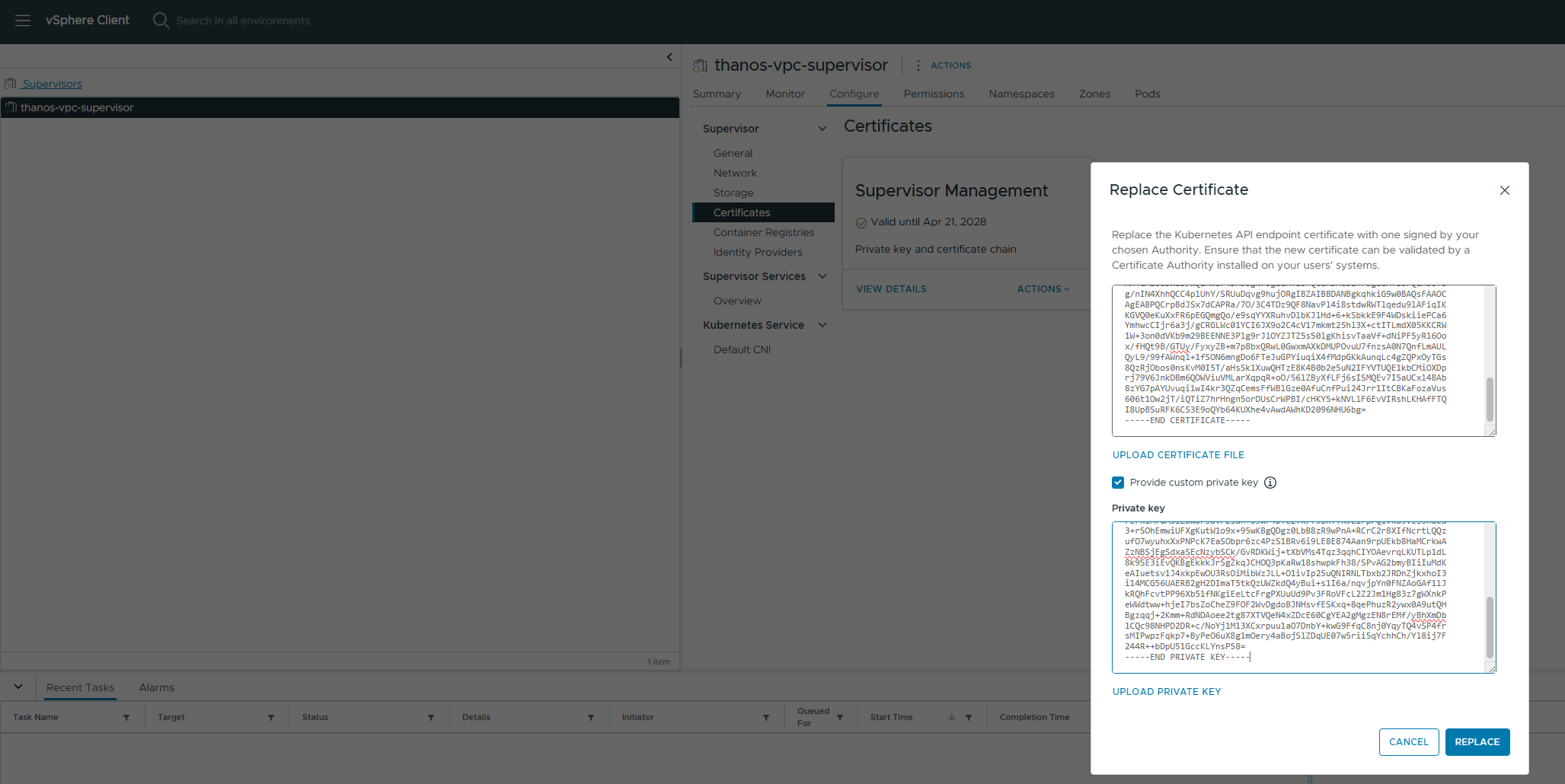
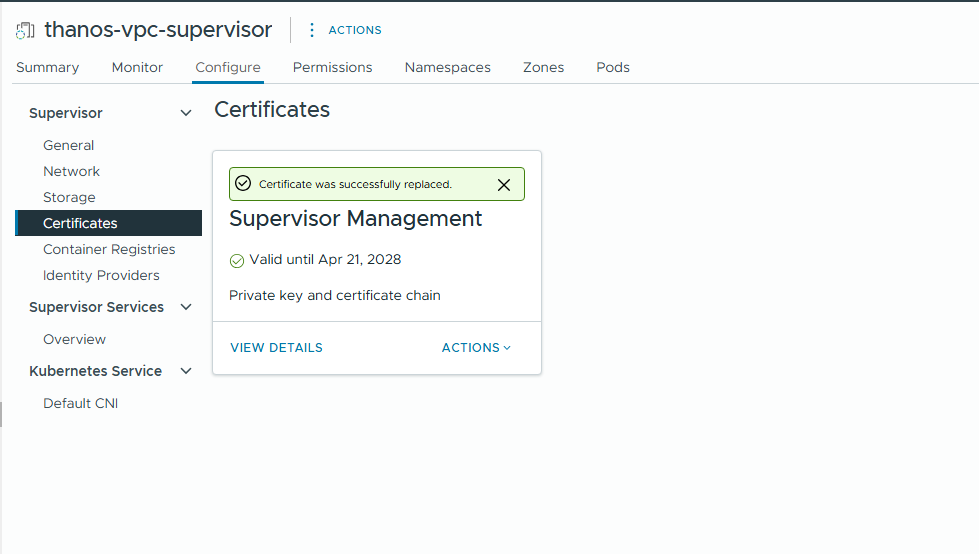
- Click on Replace and you would see a message – Certificate was successfully replaced
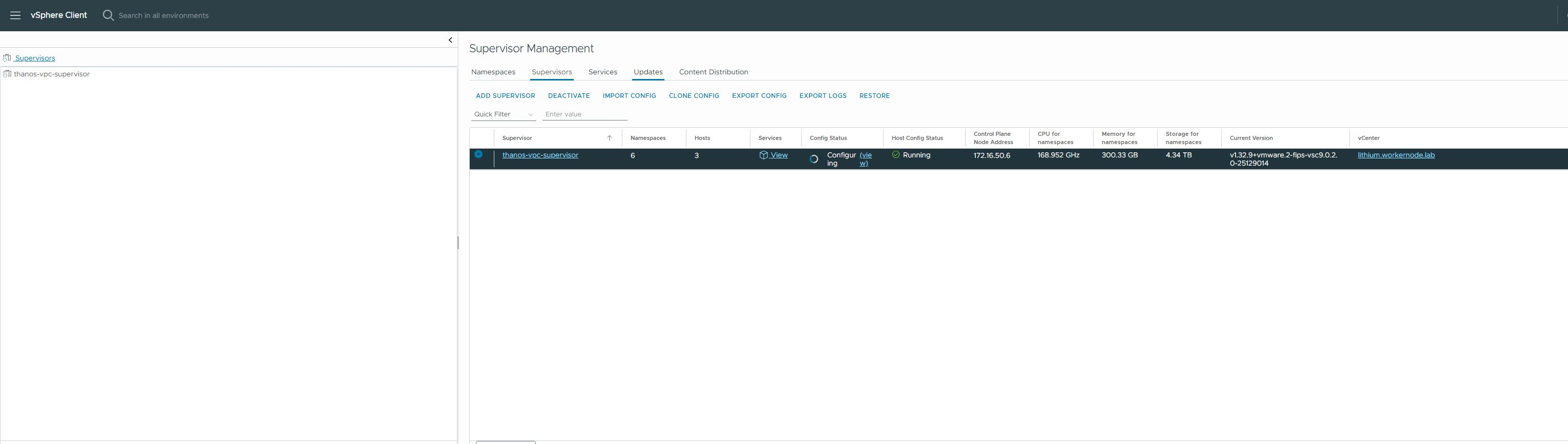
- You would see Supervisor in configuring state which would take a couple of minutes to complete.
Verify Certificate Replacement
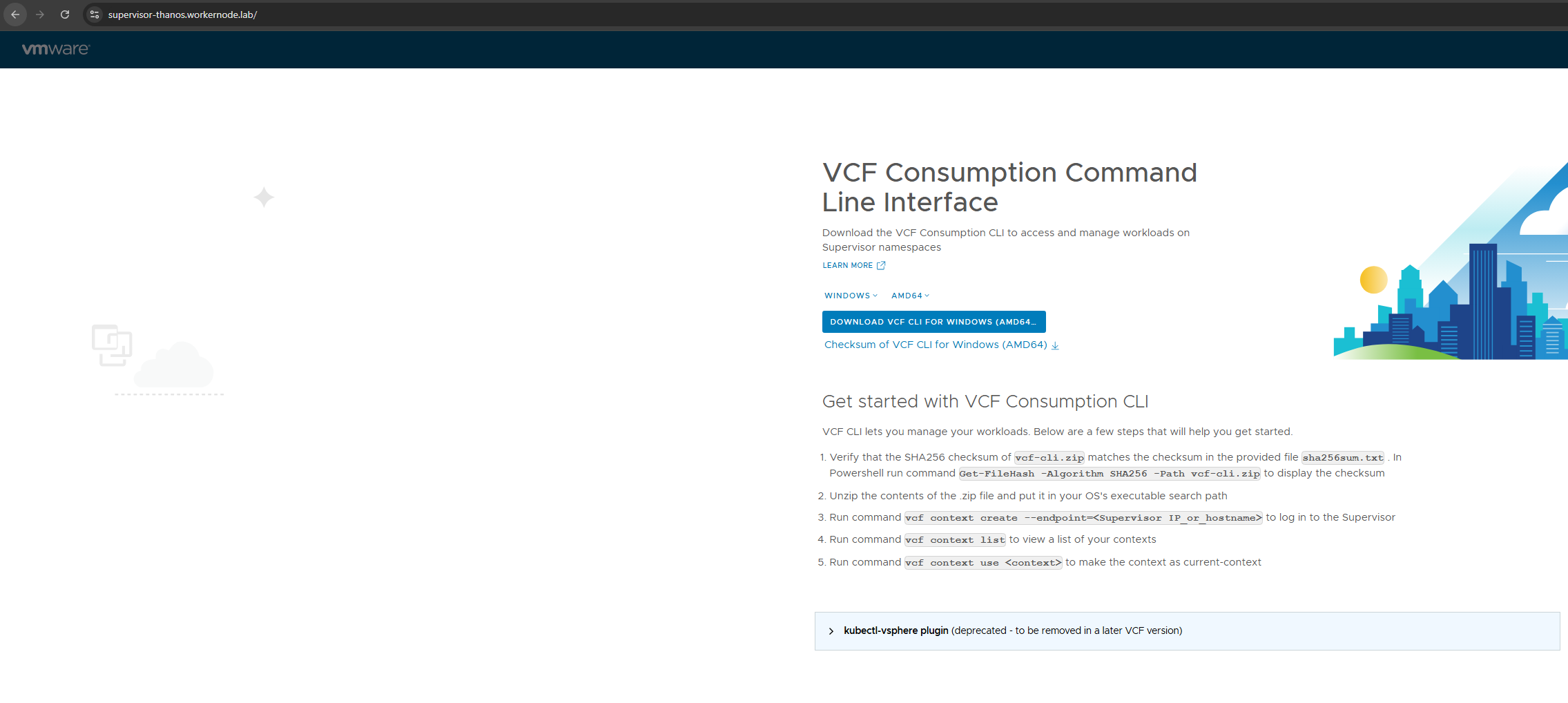
- Connect to the Supervisor API Endpoint using a browser and you should not see warning about untrusted certificate.
- Connect to the Supervisor API Endpoint using openssl and verify it returns the correct certificate
root@image-builder:/home/pj/supervisor-certificate# openssl s_client -connect supervisor-thanos.workernode.lab:443 | openssl x509 -text -nooutdepth=1 DC = lab, DC = workernode, CN = ad.workernode.labverify return:1depth=0 C = IN, ST = Karnataka, L = Bengaluru, O = Workernode, OU = IT, CN = supervisor-thanos.workernode.labverify return:1Certificate: Data: Version: 3 (0x2) Serial Number: 29:00:00:00:12:08:f3:54:eb:6d:91:53:c6:00:00:00:00:00:12 Signature Algorithm: sha256WithRSAEncryption Issuer: DC = lab, DC = workernode, CN = ad.workernode.lab Validity Not Before: Apr 22 06:29:56 2026 GMT Not After : Apr 21 06:29:56 2028 GMT Subject: C = IN, ST = Karnataka, L = Bengaluru, O = Workernode, OU = IT, CN = supervisor-thanos.workernode.lab Subject Public Key Info: Public Key Algorithm: rsaEncryption Public-Key: (2048 bit) Modulus:>>>>>>>>>>>>>>>>>>>>>>>> Signature Value: 04:f4:02:ae:90:5d:25:2c:7b:74:20:0f:45:af:fb:3b:fd:c2: e1:30:f3:f5:01:7c:35:ab:cf:97:88:bc:b2:d7:70:45:64:e5: a9:e7:6e:f6:50:05:8a:a2:0a:28:65:50:d1:e2:ae:5f:11:51: ea:91:06:42:68:10:a3:f7:bd:b2:a6:18:5d:1b:a1:bc:39:5b: 28:99:47:77:ee:be:91:26:e4:90:4f:45:e1:60:ec:92:28:9e: 3c:26:ba:62:68:70:70:22:23:af:a6:b7:8f:f8:02:44:62:d6: 73:4d:58:08:8e:89:5f:da:36:0b:87:15:d7:b9:a4:9a:dd:b9: 86:5d:d7:f9:cb:48:4c:b9:9d:5f:4e:4a:28:24:56:d5:6f:b7: a2:7d:1d:54:a6:fd:9b:6f:41:10:43:4d:13:73:e5:83:da:c9: 94:e6:19:25:36:79:b3:9d:25:80:a8:62:b2:f4:da:69:57:fe: 74:d8:8f:17:9c:91:d7:a3:a8:c7:f7:c7:42:df:41:fc:64:d4: cb:f1:72:c7:26:41:fa:6e:e9:f1:bc:50:47:02:f4:1b:0c:66: 01:79:03:31:43:ce:be:e5:3b:7e:7c:ec:03:43:7b:42:77:cb: 98:05:0b:43:22:fd:ff:df:5f:01:69:ea:97:ed:5f:48:e3:7a: 9a:78:03:a3:a1:53:78:9b:86:3d:88:ae:aa:25:f8:7c:c7:69: 18:a9:00:ba:7a:8b:73:88:19:40:fc:4e:c9:31:ac:f1:0c:d1: 8c:e6:e8:b3:49:ec:2a:f3:34:23:94:ff:68:7b:12:93:55:ee: c1:01:d3:cc:4f:0a:e0:1d:1b:d9:ee:6e:37:62:05:61:54:d4: 40:4d:64:6c:23:22:39:70:e9:ae:3e:fd:57:a2:67:90:30:66: e9:03:96:56:2b:95:30:b6:ab:5e:aa:6a:47:ea:0e:ff:9e:a5: 64:1c:97:7c:b1:63:ea:c2:12:31:01:2f:ec:8e:5a:50:2c:65: e0:10:1b:f3:36:06:ee:90:18:52:fb:aa:8b:5c:08:e2:4a:f7: 41:9a:82:7a:6b:05:7d:60:65:1b:37:b4:01:fb:82:9d:f3:ee: 8b:6e:09:ae:bd:48:b4:20:4a:68:5a:33:69:5b:ac:eb:4e:ad: d4:ec:36:8d:3f:e2:41:38:99:ee:1a:c7:9e:09:f9:a2:b0:d4: b0:2a:d6:3c:12:3f:70:72:98:e7:e9:0d:54:b9:45:e8:4b:d5: 21:1b:21:2c:a1:c0:7c:54:d0:23:c5:29:05:2b:91:14:ae:82: 4b:71:3d:a1:06:1b:eb:82:94:5e:17:b8:bc:0c:1d:01:68:4a: 0f:6d:3d:e8:d1:d4:e9:b8
Connect to Supervisor using vcf cli and now you do not need to provide the –insecure-skip-tls-verify flag each time on login.
root@image-builder:/home/pj/supervisor-certificate# vcf context create supervisor --endpoint 172.16.50.6 --username pj@workernode.lab --auth-type basicProvide Password:Logged in successfully.
Conclusion
Replacing the vSphere Supervisor Cluster certificate with a custom private key is a practical step toward aligning your Kubernetes platform with enterprise-grade security and compliance requirements. While the default certificate management is convenient for initial deployments, it often falls short in environments that demand centralized trust, strict PKI governance, and controlled certificate lifecycles.
It’s also important to treat this process as part of a broader certificate management strategy rather than a one-time task. Proactive monitoring, timely renewals, and automation can help prevent service disruptions and maintain continuous trust across your infrastructure.
Ultimately, adopting custom certificates strengthens both the security posture and operational maturity of your Supervisor environment, making it better suited for enterprise-scale workloads and integrations.
Disclaimer: All posts, contents and examples are for educational purposes in lab environments only and does not constitute professional advice. No warranty is implied or given. The user accepts that all information, contents, and opinions are my own. They do not reflect the opinions of my employer.
 VMware Cloud Foundation
Leave a comment