
Introduction
Modern application platforms are rapidly shifting towards microservices, distributed environments, and Kubernetes-native architectures. VKS (vSphere Kubernetes Service) enables organizations to run Kubernetes workloads directly on VCF (VMware Cloud Foundation) using native capabilities like vSphere DRS, HA, vSAN storage, NSX and native cluster lifecycle management.
In this blog, we’ll walk through deploying the Microservices Demo Application, also known as Online Boutique, on a vSphere Kubernetes Services cluster.
Why Deploy Online Boutique on VKS?
Online Boutique is a cloud-native sample application that consists of 11 microservices, each written in different programming languages and communicating over gRPC and REST. It acts as a realistic reference workload to showcase:
- Kubernetes-based microservices architecture
- Horizontal scaling and resiliency
- Observability and distributed tracing
- Integration with service mesh and CI/CD pipelines
The application includes frontend UI, product service, cart service, checkoutervice, recommendation engine, payment gateway simulator, etc.
Below is the Bill of Materials for the environment for this deployment
- VMware Cloud Foundation 9.0.1
- Supervisor Version v1.31.6
- vSphere Kubernetes Service 3.5.0+v1.34
- vSphere Kubernetes Runtime 1.34.1
- Bitnami Harbor
Connect to vSphere Supervisor
- Connect to vSphere Supervisor using vcf cli.
root@image-builder:/home/pj# vcf context create supervisor-vpc --endpoint 172.16.40.6 --insecure-skip-tls-verify --username pj@workernode.lab[i] Auth type vSphere SSO detected. Proceeding for authentication...Provide Password:Logged in successfully.You have access to the following contexts: supervisor-vpc supervisor-vpc:andaman supervisor-vpc:svc-cci-ns-domain-c10 supervisor-vpc:svc-tkg-domain-c10 supervisor-vpc:svc-velero-domain-c10If the namespace context you wish to use is not in this list, you may need torefresh the context again, or contact your cluster administrator.To change context, use `vcf context use <context_name>`[ok] successfully created context: supervisor-vpc[ok] successfully created context: supervisor-vpc:svc-velero-domain-c10[ok] successfully created context: supervisor-vpc:svc-cci-ns-domain-c10[ok] successfully created context: supervisor-vpc:andaman[ok] successfully created context: supervisor-vpc:svc-tkg-domain-c10root@image-builder:/home/pj# vcf context use supervisor-vpc:andaman[ok] Token is still active. Skipped the token refresh for context "supervisor-vpc:andaman"[i] Successfully activated context 'supervisor-vpc:andaman' (Type: kubernetes)[i] Fetching recommended plugins for active context 'supervisor-vpc:andaman'...[ok] All recommended plugins are already installed and up-to-date.
This environment uses an external Harbor Registry so we have to to establish trust with the registry to pull images for deployment.
Create Registry Secret
- Retrieve Certificate for the registry and encode the certificate content with double-base64.
echo | openssl s_client -connect bitnami.workernode.lab:443 | sed -ne '/-BEGIN CERTIFICATE-/,/-END CERTIFICATE-/p' > certificate.crtbase64 -w 0 certificate.crt | base64 -w 0
- Create a secret in vSphere Namespace for this registry. The yaml used to create the secret is also shown below.
root@image-builder:/home/pj# kubectl apply -f additional-ca-1.yamlsecret/demo-cluster-user-trusted-ca-secret createdroot@image-builder:/home/pj# kubectl get secret -n andamanNAME TYPE DATA AGEdemo-cluster-user-trusted-ca-secret Opaque 1 8sroot@image-builder:/home/pj# kubectl apply -f demo-cluster-deployment.yamlcluster.cluster.x-k8s.io/demo-cluster createdroot@image-builder:/home/pj# cat additional-ca-1.yamlapiVersion: v1data: additional-ca-1: TFMwdExTMUNSVWRKVGlCRFJWSlVTVVpKUTBGVVJTMHRMUzB0Q2sxSlNVZDNSRU5EUWt0cFowRjNTVUpCWjBsVVVGRkJRVUZDVVN0NWVXUXJibGh4UVd0blFVRkJRVUZCUmtSQlRrSm5hM0ZvYTJsSE9YY3dRa0ZSYzBZS1FVUkNUazFTVFhkRlVWbExRMXBKYldsYVVIbE1SMUZDUjFKWlJHSkhSbWxOVW05M1IwRlpTME5hU1cxcFdsQjVURWRSUWtkU1dVdGtNamw1WVRKV2VRcGliVGxyV2xSRllVMUNaMGRCTVZWRlFYaE5VbGxYVVhWa01qbDVZVEpXZVdKdE9XdGFVelZ6V1ZkSmQwaG9ZMDVOYWxWNFRWUkJlazFFWXpGTlZFMTNDbGRvWTA1TmFtTjRUVlJCZWsxRVl6Rk5WRTEzVjJwQ05FMVJjM2REVVZsRVZsRlJSMFYzU2twVWFrVlRUVUpCUjBFeFZVVkRRazFLVXpKR2VXSnRSakFLV1ZkMGFFMVNTWGRGUVZsRVZsRlJTRVYzYkVOYVZ6VnVXVmQ0TVdOdVZYaEZla0ZTUW1kT1ZrSkJiMVJEYkdSMlkyMTBiR050TlhaYVIxVjRRM3BCU2dwQ1owNVdRa0Z6VkVGcmJGVk5VamgzU0ZGWlJGWlJVVVJGZUZwcFlWaFNkVmxYTVhCTWJtUjJZMjEwYkdOdE5YWmFSMVYxWWtkR2FVMUpTVUpKYWtGT0NrSm5hM0ZvYTJsSE9YY3dRa0ZSUlVaQlFVOURRVkU0UVUxSlNVSkRaMHREUVZGRlFUUm1hbUpOWXprNVJsazVVWFp0Y0c1RGFVSktNbW81WVVoQk5Tc0tlRkl6T0dSSldFTlNSVkZuVm01bmEzTnlhamx4VXpSNGMyVnljRGRZTDJ3MFN6QkpOMWRSU2xack5GQklhbmxvWkU1eFFYZzNRekJ3UW1sTFZYcFlXQXBQTDJReldERmxTVmhwZVZCb2JrWXJTMlptT1ROSFltcHlWMnhrWmt4RlJ6SlZNRFpxWmt4bFYyWTBObGg2U1ZkeFdXVjNhVEEwV2pZeFRHTjFLMHcwQ2xCVk1qVlVSa0YxZW5GTFpVcElka3N2U0Rka1dqaEZhVWMzTDJkWmVHNTZkWFJsY0ZBNU0xWkhTMHhJZFcxVlIyNDNjVVIxVlc0cllVRmlVVk5HYzBvS1dqRnJXVzVrSzNwdldEQmlOVllyVTJSdE5VTndkMEpOWld0elFrMTFiR3g1Y0hsRVdGZ3lUR2RDYjNWU2JrMU5jR1o2VFVkS09GZEVZalZ0YVRGTVNBcDViM1E0ZFVoWFVGSjZaMng0TlhRMFlqbE5WamN4TVV4d1NVUmlkQzl4YnlzNVpXdHRZME5FZFVVdk5XY3ZWSFl6Vlhob2QxRnpkV3BSU1VSQlVVRkNDbTgwU1VOaVJFTkRRVzFuZDAxQldVUldVakJTUWtOcmQwbzBZMFZ5UWtFd1IwbEpWMWx0YkRCaWJVWjBZVk0xTTJJelNuSmFXRXAxWWpKU2JFeHRlR2dLV1c5SlNGbHRiREJpYlVaMFlWUkJaRUpuVGxaSVVUUkZSbWRSVldkTU4zaDFRekF4Wm5OUWJVb3JNMnRZWkZoeWNubHBlbWR2UlhkSWQxbEVWbEl3YWdwQ1FtZDNSbTlCVldaVE5VSkZha1YzUlZGbGFHRnlMMWhsTTBOaGFFUlFNbkY1ZDNkbll6QkhRVEZWWkVoM1UwSjRWRU5DZDJwRFFuWTJRMEoyUzBOQ0NuVlpZVUowYlhocldWaEJOa3g1T0haUk1EUTVXVmRSZFdReU9YbGhNbFo1WW0wNWExcFROWE5aVjBselVUQTBPVmxYVVhOUk1EUTVVVEJTVVV4RlRrOEtVRlpDTVZsdGVIQlplVlY1VFVWMGJHVlRWWGxOUms1c1kyNWFjRmt5Vm5wTVJVNVBVRlpPYkdOdVduQlpNbFo2VEVWT1QxQlZUblppYlZwd1dqTldlUXBaV0ZKd1lqSTBjMUpGVFRsa01qbDVZVEpXZVdKdE9XdGFVM2hGVVhveGMxbFhTUzlaTWxaNVpFZHNiV0ZYVG1oa1IxWlRXbGhhZGxreVJqQmhWemwxQ2xSSGJIcGtSRGxwV1ZoT2JGQXlPV2xoYlZacVpFVk9jMWxZVG5wUVYwNVRWRVZTY0dNelVubGhWMG94WkVkc2RtSnNRblpoVnpVd1RVbElSMEpuWjNJS1FtZEZSa0pSWTBKQlVWTkNkVlJEUW5ScVEwSnpkMWxKUzNkWlFrSlJWVWhOUVV0SFoyRmFjMXBIUm5kUGFUaDJUREJPVDFCWFJtdE1ibVIyWTIxMGJBcGpiVFYyV2tkVmRXSkhSbWxNUlU1UFVGVkdTbEZUZUVSVWFqRlJaRmRLYzJGWFRXeE5ha0pNV2xocmJFMXFRbFJhV0VveVlWZE9iR041ZUVSVWFqRlVDbHBZU2pKaFYwNXNZM2w0UkZScU1VUmlNalZ0WVZka01XTnRSakJoVnpsMVRFVlNSRkJZWkhaamJYUnNZMjAxZGxwSFZYTlNSVTA1WWtkR2FWQXlUa0lLVVRKV2VXUkhiRzFoVjA1b1pFZFZMMWx0Um5wYVZEbDJXVzF3YkZrelVrUmlSMFo2WTNveGFscFlTakJoVjFwd1dUSkdNR0ZYT1hWUldGWXdZVWM1ZVFwaFdGSTFUVUYzUjBFeFZXUkZkMFZDTDNkUlEwMUJRWGRFWjFsRVZsSXdVRUZSU0M5Q1FWRkVRV2RZWjAxRU1FZERVM05IUVZGUlFtZHFZMVpDZDFGM0NrMURORWRLYVhOSFFWRlJRbWRxWTFaRFNVaE5Na2MyU0hvMFVucG5LekpXU1RoTFNrSnZWRFEzUkdWQ1psbE1hbko1ZFVNemNGVlFRV2RHYTBGblJVd0tUVUV3UjBOVGNVZFRTV0l6UkZGRlFrTjNWVUZCTkVsRFFWRkNNR1ZXY0haUmNGRjVOSE14VVVKNVZFMUNiM0ZLVDI1d2VsVm9WVEZvWm1GalFteHNhZ3BUVUdoVlJGQnZkWGcyVVdaRlZWQnRXRkp6WTFSS2RITnplV2RqVEU1TWNUSXJSRlpLTkUxS1pIQktXVEZxUkhGVlVtUlhjRWgwWjFSUVpVVmlZVWR1Q2tGcWRsSmlhV2hNS3poNlNGQndOelJ1VFhJMmFIVTVXVzVNV1dWSGMybzNhamxWVTBoM0t6Um5la3d6WlRGNU9XcHljazFrZVc0elIxcDZkMlF2TTNnS1ZYVmpSRzB3YlVSS2FXVm9URnBKU2xOSVdqYzJjamRQT0dsNlFtNUNUVFk1Tld0WWJqQXpaMXBoZUZoUlNHOUVTbkl4Y2paR1RIQjRUVXRyWVZJeldBcENOMjAyT1dzNVMyZEpTVzUwYjNaWWVVNXlORWhVWnpoSU5EUkdVa3A1UzBSdFdYUkpMemxrUWtoR0szbHVTM0JCWjB4eE5XeDFZVk55WW1JeE5HRnVDbTVWZDB0dFlYcE1PVTVaTTA1WlpuUTVTaXRGZFhZeWVFdE5kVkZwVlZWSllXaG9Ta2RETDBoNk56aFBaMDVzUzIxbWJrOTZURnBZV1V4b2VpdEhkVXdLZDBzdmVWTjBVVGR0Um1sU2VIQnpOMncxTnpWaFpDOW1abkYzY0RnMlFuQm5VMDlLYzI4MlJYRldVMmM0UVRkeU5VOXViMmhzWkdGNVowRndUMWN3U2dwRmVraGhabk0wT1V0dFFubHVhVE56UW0wMWVrVkJUazB4VkRSa2FGQTFMMGc1TDJSdVZHZ3dibTlCTUdoaFowVjFja05NUVhobFVUVkxUVTFRU0dOWkNsazNWVVUwY0ZOQmJ5OTBWWEJxV2pZeFUwSm1PRU5KYWxGS1dpdHJWRUUzZVhZM1VGbHlWemwyWVhCUFlsaHhSWGRLYkN0bFUzcEZPRXBQUkU4d1NrRUtkR2RyUjFKVFNIbGpSRlF3VGtGTWR6bE1UMjFCTVdzek4xWkhiRTAyTXpjNFdHbDJVWFZIYlVKeVJERnZVVWRTZG1aalpFZFplaXRRVFZCU2IwazRSUXBDV2sxSmRuVjVTRTlNYkdvMU1YVlBRMkkzTVhOaE9FcFFOMEp2VGt3dmJuQXhSa05CYm0xeGRHbzVXRzlRVG05bVVsTjBNVTV0VTNVMlIzZHZXREJvQ2k5emRWWnVVVDA5Q2kwdExTMHRSVTVFSUVORlVsUkpSa2xEUVZSRkxTMHRMUzBLkind: Secretmetadata: name: demo-cluster-user-trusted-ca-secret namespace: andamantype: Opaque
Deploy VKS Cluster
- Create the VKS cluster by providing the secret in cluster yaml under additionalTrustedCAs section with secret & key name.
root@image-builder:/home/pj# kubectl apply -f demo-cluster-deployment.yamlcluster.cluster.x-k8s.io/demo-cluster created
- Below is the YAML file used to create the VKS cluster. The cluster has 1 Control Plane node with 2vCPU/4 GB RAM and 1 Worker Node with 4 vCPU and 16GB RAM.
apiVersion: cluster.x-k8s.io/v1beta2kind: Clustermetadata: name: demo-cluster namespace: andamanspec: clusterNetwork: pods: cidrBlocks: - 192.168.156.0/20 services: cidrBlocks: - 10.96.0.0/12 serviceDomain: cluster.local topology: classRef: name: builtin-generic-v3.5.0 namespace: vmware-system-vks-public version: v1.34.1+vmware.1-vkr.4 variables: - name: vsphereOptions value: persistentVolumes: defaultStorageClass: vks-policy - name: kubernetes value: certificateRotation: enabled: true renewalDaysBeforeExpiry: 90 security: podSecurityStandard: audit: restricted auditVersion: latest enforce: privileged enforceVersion: latest warn: privileged warnVersion: latest - name: vmClass value: guaranteed-small - name: storageClass value: vks-policy - name: osConfiguration value: trust: additionalTrustedCAs: - caCert: secretRef: key: "additional-ca-1" name: "demo-cluster-user-trusted-ca-secret" controlPlane: replicas: 1 metadata: annotations: run.tanzu.vmware.com/resolve-os-image: os-name=ubuntu, content-library=cl-cc9e521762925e682, os-version=24.04 workers: machineDeployments: - class: node-pool name: demo-app-cluster-np-e93l replicas: 1 metadata: annotations: run.tanzu.vmware.com/resolve-os-image: os-name=ubuntu, content-library=cl-cc9e521762925e682, os-version=24.04 variables: overrides: - name: vmClass value: best-effort-large - name: volumes value: - name: containerd-v mountPath: /var/lib/containerd storageClass: vks-policy capacity: 20Gi - name: kubelet-v mountPath: /var/lib/kubelet storageClass: vks-policy capacity: 20Gi
- Wait for the cluster creation to finish and verify the cluster status
root@image-builder:/home/pj# kubectl get clusters -ANAMESPACE NAME CLUSTERCLASS AVAILABLE CP DESIRED CP AVAILABLE CP UP-TO-DATE W DESIRED W AVAILABLE W UP-TO-DATE PHASE AGE VERSIONandaman demo-cluster builtin-generic-v3.5.0 True 1 1 1 1 1 1 Provisioned 5m v1.34.1+vmware.1root@image-builder:/home/pj# kubectl describe cluster demo-clusterName: demo-clusterNamespace: andamanLabels: addon.addons.kubernetes.vmware.com/cluster-autoscaler=automatic cluster.x-k8s.io/cluster-name=demo-cluster run.tanzu.vmware.com/tkr=v1.34.1---vmware.1-vkr.4 topology.cluster.x-k8s.io/owned=Annotations: run.tanzu.vmware.com/tkr-spec: H4sIAAAAAAAC/7xVwY6kNhC9z1eguUb22mBo4JpTFOUSRTlktYoKu7rHaWNbtmE0G+Xfo4FeYKaZ7dEclhvlV49XVa9MevLYY4L2Lsuy7KytarNfhw6DxYTxdzQIEacz8HrEELWzbX... tkg.tanzu.vmware.com/skip-tls-verify: tkg.tanzu.vmware.com/tkg-http-proxy: tkg.tanzu.vmware.com/tkg-https-proxy: tkg.tanzu.vmware.com/tkg-ip-family: tkg.tanzu.vmware.com/tkg-no-proxy: tkg.tanzu.vmware.com/tkg-proxy-ca-cert: tkg.tanzu.vmware.com/tkg-registry-additional-ca-cert: LS0tLS1CRUdJTiBDRVJUSUZJQ0FURS0tLS0tCk1JSUd3RENDQktpZ0F3SUJBZ0lUUFFBQUFCUSt5eWQrblhxQWtnQUFBQUFBRkRBTkJna3Foa2lHOXcwQkFRc0YKQURCTk1STXdFUV... tkg.tanzu.vmware.com/tkg-registry-additional-skip-tls-verify:API Version: cluster.x-k8s.io/v1beta2>>>>>>>>>>>>>>>>>>>>>>>>>>>>> Control Plane: Available Replicas: 1 Desired Replicas: 1 Ready Replicas: 1 Replicas: 1 Up To Date Replicas: 1>>>>>>>>>>>>>>>>>>>>>>>>>>>>> Workers: Available Replicas: 1 Desired Replicas: 1 Ready Replicas: 1 Replicas: 1 Up To Date Replicas: 1Events: Type Reason Age From Message ---- ------ ---- ---- ------- Normal Pending 4m56s cluster-controller Cluster demo-cluster is Pending Normal TopologyCreate 4m56s topology/cluster-controller Created VSphereCluster "andaman/demo-cluster-kbfrm" Normal TopologyCreate 4m56s topology/cluster-controller Created VSphereMachineTemplate "andaman/demo-cluster-zrnlt" Normal TopologyCreate 4m56s topology/cluster-controller Created KubeadmControlPlane "andaman/demo-cluster-kfkrt" Normal TopologyUpdate 4m56s topology/cluster-controller Updated Cluster "andaman/demo-cluster" Normal TopologyCreate 4m56s topology/cluster-controller Created VSphereMachineTemplate "andaman/demo-cluster-demo-app-cluster-np-e93l-ffl2f" Normal TopologyCreate 4m56s topology/cluster-controller Created KubeadmConfigTemplate "andaman/demo-cluster-demo-app-cluster-np-e93l-zxpm8" Normal Provisioning 4m56s (x2 over 4m56s) cluster-controller Cluster demo-cluster is Provisioning Normal TopologyCreate 4m56s topology/cluster-controller Created MachineDeployment "andaman/demo-cluster-demo-app-cluster-np-e93l-5s46g" Normal InfrastructureReady 4m54s (x2 over 4m54s) cluster-controller Cluster demo-cluster InfrastructureProvisioned is now True Normal Provisioned 4m54s (x2 over 4m54s) cluster-controller Cluster demo-cluster is Provisioned Normal ControlPlaneInitialized 2m4s (x2 over 2m4s) cluster-controller Cluster demo-cluster ControlPlaneInitialized is now True
- Login to the VKS cluster and create a new namespace for the application deployment.
root@image-builder:/home/pj# vcf context create demo-cluster --endpoint 172.16.40.6 --insecure-skip-tls-verify --workload-cluster-name demo-cluster --workload-cluster-namespace andaman --username pj@workernode.labProvide Password:[i] Logging in to Kubernetes cluster (demo-cluster) (andaman)[i] Successfully logged in to Kubernetes cluster 172.16.40.7You have access to the following contexts: demo-cluster demo-cluster:demo-clusterIf the namespace context you wish to use is not in this list, you may need torefresh the context again, or contact your cluster administrator.To change context, use `vcf context use <context_name>`[ok] successfully created context: demo-cluster[ok] successfully created context: demo-cluster:demo-clusterroot@image-builder:/home/pj# vcf context use demo-cluster:demo-cluster\[ok] Token is still active. Skipped the token refresh for context "demo-cluster:demo-cluster"[i] Successfully activated context 'demo-cluster:demo-cluster' (Type: kubernetes)[i] Fetching recommended plugins for active context 'demo-cluster:demo-cluster'...[ok] No recommended plugins found.root@image-builder:/home/pj# kubectl get nodes -o wideNAME STATUS ROLES AGE VERSION INTERNAL-IP EXTERNAL-IP OS-IMAGE KERNEL-VERSION CONTAINER-RUNTIMEdemo-cluster-demo-app-cluster-np-e93l-5s46g-cnbd9-sxnl4 Ready <none> 4m30s v1.34.1+vmware.1 172.26.0.4 <none> Ubuntu 24.04.3 LTS 6.8.0-86-generic containerd://2.1.4+vmware.3-fipsdemo-cluster-kfkrt-sv4r6 Ready control-plane 6m27s v1.34.1+vmware.1 172.26.0.3 <none> Ubuntu 24.04.3 LTS 6.8.0-86-generic containerd://2.1.4+vmware.3-fipsroot@image-builder:/home/pj# kubectl create ns boutique-appnamespace/boutique-app created
Push Application Images to Harbor Registry
The first step would be to pull a
- Pull all images from Docker
docker pull us-central1-docker.pkg.dev/google-samples/microservices-demo/emailservice:v0.10.3docker pull us-central1-docker.pkg.dev/google-samples/microservices-demo/checkoutservice:v0.10.3docker pull us-central1-docker.pkg.dev/google-samples/microservices-demo/recommendationservice:v0.10.3docker pull us-central1-docker.pkg.dev/google-samples/microservices-demo/frontend:v0.10.3docker pull us-central1-docker.pkg.dev/google-samples/microservices-demo/paymentservice:v0.10.3docker pull us-central1-docker.pkg.dev/google-samples/microservices-demo/productcatalogservice:v0.10.3docker pull us-central1-docker.pkg.dev/google-samples/microservices-demo/cartservice:v0.10.3docker pull redis:alpinedocker pull busybox:latestdocker pull us-central1-docker.pkg.dev/google-samples/microservices-demo/loadgenerator:v0.10.3docker pull us-central1-docker.pkg.dev/google-samples/microservices-demo/currencyservice:v0.10.3docker pull us-central1-docker.pkg.dev/google-samples/microservices-demo/shippingservice:v0.10.3docker pull us-central1-docker.pkg.dev/google-samples/microservices-demo/adservice:v0.10.3
- Login to Harbor Registry to push the images
docker login bitnami.workernode.lab -u admin
- Tag the images
docker tag 625114d0d854 bitnami.workernode.lab/boutique-app/emailservice:v0.10.3docker tag 71e3f26473a1 bitnami.workernode.lab/boutique-app/checkoutservice:v0.10.3docker tag e51b38483156 bitnami.workernode.lab/boutique-app/recommendationservice:v0.10.3docker tag f9b55abdb0f4 bitnami.workernode.lab/boutique-app/frontend:v0.10.3docker tag a175e010bace bitnami.workernode.lab/boutique-app/paymentservice:v0.10.3docker tag c7293efb5071 bitnami.workernode.lab/boutique-app/productcatalogservice:v0.10.3docker tag 74e28b2a2ffa bitnami.workernode.lab/boutique-app/cartservice:v0.10.3docker tag 3bcc86ad8fe9 bitnami.workernode.lab/boutique-app/redis:alpinedocker tag 08ef35a1c3f0 bitnami.workernode.lab/boutique-app/busybox:latestdocker tag c9fdb64e5f98 bitnami.workernode.lab/boutique-app/loadgenerator:v0.10.3docker tag f154fb453696 bitnami.workernode.lab/boutique-app/currencyservice:v0.10.3docker tag d0d1ba60b940 bitnami.workernode.lab/boutique-app/shippingservice:v0.10.3docker tag 7cddcf253d6d bitnami.workernode.lab/boutique-app/adservice:v0.10.3
- Push the images to Harbor Registry
docker push bitnami.workernode.lab/boutique-app/emailservice:v0.10.3docker push bitnami.workernode.lab/boutique-app/checkoutservice:v0.10.3docker push bitnami.workernode.lab/boutique-app/recommendationservice:v0.10.3docker push bitnami.workernode.lab/boutique-app/frontend:v0.10.3docker push bitnami.workernode.lab/boutique-app/paymentservice:v0.10.3docker push bitnami.workernode.lab/boutique-app/productcatalogservice:v0.10.3docker push bitnami.workernode.lab/boutique-app/cartservice:v0.10.3docker push bitnami.workernode.lab/boutique-app/redis:alpinedocker push bitnami.workernode.lab/boutique-app/busybox:latestdocker push bitnami.workernode.lab/boutique-app/loadgenerator:v0.10.3docker push bitnami.workernode.lab/boutique-app/currencyservice:v0.10.3docker push bitnami.workernode.lab/boutique-app/shippingservice:v0.10.3docker push bitnami.workernode.lab/boutique-app/adservice:v0.10.3
Installing Contour Ingress Add-on
As the application would be exposed by Ingress we would be installing Contour on VKS cluster using VKS Add-On Management.
- Switch to supervisor context and list the available repository for installing the add-ons.
root@image-builder:/home/pj# vcf context list[i] Refreshing plugin inventory cache for "projects.packages.broadcom.com/vcf-cli/plugins/plugin-inventory:latest", this will take a few seconds. NAME CURRENT TYPE demo-cluster false kubernetes demo-cluster:demo-cluster true kubernetes supervisor-vpc false kubernetes supervisor-vpc:andaman false kubernetes supervisor-vpc:svc-cci-ns-domain-c10 false kubernetes supervisor-vpc:svc-tkg-domain-c10 false kubernetes supervisor-vpc:svc-velero-domain-c10 false kubernetes[i] Use '--wide' to view additional columns.root@image-builder:/home/pj# vcf context use supervisor-vpc[ok] Token is still active. Skipped the token refresh for context "supervisor-vpc"[i] Successfully activated context 'supervisor-vpc' (Type: kubernetes)[i] Fetching recommended plugins for active context 'supervisor-vpc'...[ok] All recommended plugins are already installed and up-to-date.root@image-builder:/home/pj# vcf addon repository-install list NAME NAMESPACE ADDONREPOSITORY READY default-addon-repo-install vmware-system-vks-public default-addonrepository-3.5.0 True
- List all available add-ons and versions for cert-manager & contour packages.
root@image-builder:/home/pj# vcf addon available list NAMESPACE ADDONNAME DESCRIPTION vmware-system-vks-public ako Integrates VMware NSX Advanced Load Balancer with Kubernetes for L4-L7 services. vmware-system-vks-public cert-manager Certificate management vmware-system-vks-public cluster-autoscaler Automatically scale Kubernetes cluster nodes vmware-system-vks-public contour An ingress controller vmware-system-vks-public default-addon-repo-install Standard PackageRepository for addons to install on Kubernetes Clusters vmware-system-vks-public external-dns This package provides DNS synchronization functionality. vmware-system-vks-public fluent-bit Fluent Bit is a fast Log Processor and Forwarder vmware-system-vks-public harbor OCI Registry vmware-system-vks-public istio networking service mesh solution for containers vmware-system-vks-public prometheus A time series database for your metrics vmware-system-vks-public sriov-network-device-plugin The SR-IOV Network Device Plugin is Kubernetes device plugin for discovering and advertising SR-IOV virtual functions (VFs) available on a Kubernetes host vmware-system-vks-public telegraf collect and report metrics vmware-system-vks-public velero Velero is an open source tool to safely backup and restore, perform disaster recovery, and migrate Kubernetes cluster resources and persistent volumes. vmware-system-vks-public vks-static-resources vks managed static resources vmware-system-vks-public vsphere-pv-csi-webhook vSphere paravirtual CSI provider webhook vmware-system-vks-public windows-gmsa-webhook Windows Group Managed Service Accounts (GMSA) Kubernetes Webhookroot@image-builder:/home/pj# vcf addon available list cert-manager NAMESPACE ADDONNAME VERSION ADDON-RELEASE-NAME PACKAGE vmware-system-vks-public cert-manager 1.18.2+vmware.2-vks.2 cert-manager.kubernetes.vmware.com.1.18.2-vmware.2-vks.2 cert-manager.kubernetes.vmware.com/1.18.2+vmware.2-vks.2root@image-builder:/home/pj# vcf addon available list contour NAMESPACE ADDONNAME VERSION ADDON-RELEASE-NAME PACKAGE vmware-system-vks-public contour 1.33.0+vmware.1-vks.1 contour.kubernetes.vmware.com.1.33.0-vmware.1-vks.1 contour.kubernetes.vmware.com/1.33.0+vmware.1-vks.1
- Switch to vSphere Namespace context . Install cert-manager package on the cluster as it’s a pre-requisiste for Contour . For this I have switched to vSphere Namespace where VKS Cluster is deployed. The package installation takes a couple of minutes and Ready state should be true on successful deployment for the package.
root@image-builder:/home/pj# vcf context use supervisor-vpc:andaman[ok] Token is still active. Skipped the token refresh for context "supervisor-vpc:andaman"[i] Successfully activated context 'supervisor-vpc:andaman' (Type: kubernetes)[i] Fetching recommended plugins for active context 'supervisor-vpc:andaman'...[ok] All recommended plugins are already installed and up-to-date.root@image-builder:/home/pj# vcf cluster list -A NAME NAMESPACE STATUS CONTROLPLANE WORKERS KUBERNETES KUBERNETESRELEASE demo-cluster andaman running 1/1 1/1 v1.34.1+vmware.1 v1.34.1---vmware.1-vkr.4root@image-builder:/home/pj# vcf addon install create cert-manager --cluster-name demo-clusterInstalling addon 'cert-manager' for cluster 'demo-cluster'. Are you sure? [y/N]: yAddon 'cert-manager' is being installed in the cluster demo-clusterroot@image-builder:/home/pj# vcf addon install list --cluster-name demo-cluster ADDONNAME NAMESPACE PAUSED READY DELETE/UPGRADE cert-manager andaman false True Allowed default-addon-repo-install andaman false True NotAllowed vks-static-resources andaman false True NotAllowed
- Install Contour on VKS Cluster by generating the values.yaml for the package and editing the values.yaml by setting Envoy service to LoadBalancer. The package installation takes a couple of minutes and Ready state should be true on successful deployment for the package.
root@image-builder:/home/pj# vcf addon available-releases get contour.kubernetes.vmware.com.1.33.0-vmware.1-vks.1 -o contour.yamlroot@image-builder:/home/pj# cat contour.yamlinfrastructure_provider: vspherenamespace: tanzu-system-ingresscontour: configFileContents: {} useProxyProtocol: false replicas: 2 pspNames: "vmware-system-restricted" logLevel: infoenvoy: service: type: LoadBalancer annotations: {} externalTrafficPolicy: Cluster disableWait: false hostPorts: enable: true http: 80 https: 443 hostNetwork: false terminationGracePeriodSeconds: 300 logLevel: infocertificates: caDuration: 8760h caRenewBefore: 720h leafDuration: 720h leafRenewBefore: 360hroot@image-builder:/home/pj# vcf addon available list contour NAMESPACE ADDONNAME VERSION ADDON-RELEASE-NAME PACKAGE vmware-system-vks-public contour 1.33.0+vmware.1-vks.1 contour.kubernetes.vmware.com.1.33.0-vmware.1-vks.1 contour.kubernetes.vmware.com/1.33.0+vmware.1-vks.1root@image-builder:/home/pj# vcf addon install create contour --cluster-name demo-cluster -v '1.33.0+vmware.1-vks.1' -f contour.yamlInstalling addon 'contour' for cluster 'demo-cluster'. Are you sure? [y/N]: yAddon 'contour' is being installed in the cluster demo-clusterroot@image-builder:/home/pj# vcf addon install list --cluster-name demo-cluster ADDONNAME NAMESPACE PAUSED READY DELETE/UPGRADE cert-manager andaman false True Allowed contour andaman false True Allowed default-addon-repo-install andaman false True NotAllowed vks-static-resources andaman false True NotAllowed
Deployment of Application on VKS Cluster
- Get the application manifest from Github and change the image path to the Harbor Registry where application images are uploaded. Additionally change the frontend type from LoadBalancer to ClusterIP as we would expose the application via Contour Ingress.
- Deploy the application on VKS Cluster
root@image-builder:/home/pj# kubectl apply -f google-application.yamldeployment.apps/emailservice createdservice/emailservice createdserviceaccount/emailservice createddeployment.apps/checkoutservice createdservice/checkoutservice createdserviceaccount/checkoutservice createddeployment.apps/recommendationservice createdservice/recommendationservice createdserviceaccount/recommendationservice createddeployment.apps/frontend createdservice/frontend createdservice/frontend-external createdserviceaccount/frontend createddeployment.apps/paymentservice createdservice/paymentservice createdserviceaccount/paymentservice createddeployment.apps/productcatalogservice createdservice/productcatalogservice createdserviceaccount/productcatalogservice createddeployment.apps/cartservice createdservice/cartservice createdserviceaccount/cartservice createddeployment.apps/redis-cart createdservice/redis-cart createddeployment.apps/loadgenerator createdserviceaccount/loadgenerator createddeployment.apps/currencyservice createdservice/currencyservice createdserviceaccount/currencyservice createddeployment.apps/shippingservice createdservice/shippingservice createdserviceaccount/shippingservice createddeployment.apps/adservice createdservice/adservice createdserviceaccount/adservice created
- Verify Application Deployment
root@image-builder:/home/pj# kubectl get all -n boutique-appNAME READY STATUS RESTARTS AGEpod/adservice-fc9c6c5f9-t6f7q 1/1 Running 0 35spod/cartservice-5479d49b8b-bbpz4 1/1 Running 0 36spod/checkoutservice-6f7b85ff49-qcvgd 1/1 Running 0 37spod/currencyservice-6c9d744f9c-5h5qn 1/1 Running 0 36spod/emailservice-5d5c4f45df-f6wsc 1/1 Running 0 37spod/frontend-8574df5676-2dwd2 1/1 Running 0 36spod/loadgenerator-5b9659cfbd-scsp2 1/1 Running 0 36spod/paymentservice-d65f55669-rlmpw 1/1 Running 0 36spod/productcatalogservice-cc74b95bf-f6hlv 1/1 Running 0 36spod/recommendationservice-65c44c7895-btkmz 1/1 Running 0 37spod/redis-cart-c8ff86559-flcrw 1/1 Running 0 36spod/shippingservice-6db495bdcc-h5rrg 1/1 Running 0 35sNAME TYPE CLUSTER-IP EXTERNAL-IP PORT(S) AGEservice/adservice ClusterIP 10.108.196.85 <none> 9555/TCP 36sservice/cartservice ClusterIP 10.101.175.123 <none> 7070/TCP 36sservice/checkoutservice ClusterIP 10.100.45.255 <none> 5050/TCP 37sservice/currencyservice ClusterIP 10.100.134.108 <none> 7000/TCP 36sservice/emailservice ClusterIP 10.107.118.214 <none> 5000/TCP 37sservice/frontend ClusterIP 10.108.80.40 <none> 80/TCP 37sservice/frontend-external ClusterIP 10.103.185.86 <none> 80/TCP 37sservice/paymentservice ClusterIP 10.109.228.129 <none> 50051/TCP 36sservice/productcatalogservice ClusterIP 10.108.31.42 <none> 3550/TCP 36sservice/recommendationservice ClusterIP 10.102.193.242 <none> 8080/TCP 37sservice/redis-cart ClusterIP 10.103.92.189 <none> 6379/TCP 36sservice/shippingservice ClusterIP 10.104.37.96 <none> 50051/TCP 36sNAME READY UP-TO-DATE AVAILABLE AGEdeployment.apps/adservice 1/1 1 1 36sdeployment.apps/cartservice 1/1 1 1 36sdeployment.apps/checkoutservice 1/1 1 1 37sdeployment.apps/currencyservice 1/1 1 1 36sdeployment.apps/emailservice 1/1 1 1 37sdeployment.apps/frontend 1/1 1 1 37sdeployment.apps/loadgenerator 1/1 1 1 36sdeployment.apps/paymentservice 1/1 1 1 36sdeployment.apps/productcatalogservice 1/1 1 1 36sdeployment.apps/recommendationservice 1/1 1 1 37sdeployment.apps/redis-cart 1/1 1 1 36sdeployment.apps/shippingservice 1/1 1 1 36sNAME DESIRED CURRENT READY AGEreplicaset.apps/adservice-fc9c6c5f9 1 1 1 35sreplicaset.apps/cartservice-5479d49b8b 1 1 1 36sreplicaset.apps/checkoutservice-6f7b85ff49 1 1 1 37sreplicaset.apps/currencyservice-6c9d744f9c 1 1 1 36sreplicaset.apps/emailservice-5d5c4f45df 1 1 1 37sreplicaset.apps/frontend-8574df5676 1 1 1 37sreplicaset.apps/loadgenerator-5b9659cfbd 1 1 1 36sreplicaset.apps/paymentservice-d65f55669 1 1 1 36sreplicaset.apps/productcatalogservice-cc74b95bf 1 1 1 36sreplicaset.apps/recommendationservice-65c44c7895 1 1 1 37sreplicaset.apps/redis-cart-c8ff86559 1 1 1 36sreplicaset.apps/shippingservice-6db495bdcc 1 1 1 36s
Configure Ingress
- Create a Kubernetes TLS Secret in the same namespace as application which we would apply to Contour Ingress resource.
kubectl create secret tls boutique-app-tls --namespace boutique-app --key /home/pj/boutique-cert/boutique.key --cert /home/pj/boutique-cert/boutique.crt- To expose the frontend service using Ingress, create an ingress resource. Map it to the frontend service of the application. Use the TLS secret created above.
root@image-builder:/home/pj# cat ingress.yamlapiVersion: networking.k8s.io/v1kind: Ingressmetadata: name: vks-app-ingress namespace: boutique-app annotations: ingressClassName: contourspec: tls: - hosts: - boutique.workernode.lab secretName: boutique-app-tls rules: - host: boutique.workernode.lab http: paths: - path: / pathType: Prefix backend: service: name: frontend port: number: 80root@image-builder:/home/pj# kubectl apply -f ingress.yamlingress.networking.k8s.io/vks-app-ingress createdroot@image-builder:/home/pj# kubectl get ingress -ANAMESPACE NAME CLASS HOSTS ADDRESS PORTS AGEboutique-app vks-app-ingress <none> boutique.workernode.lab 172.16.40.9 80, 443 5s
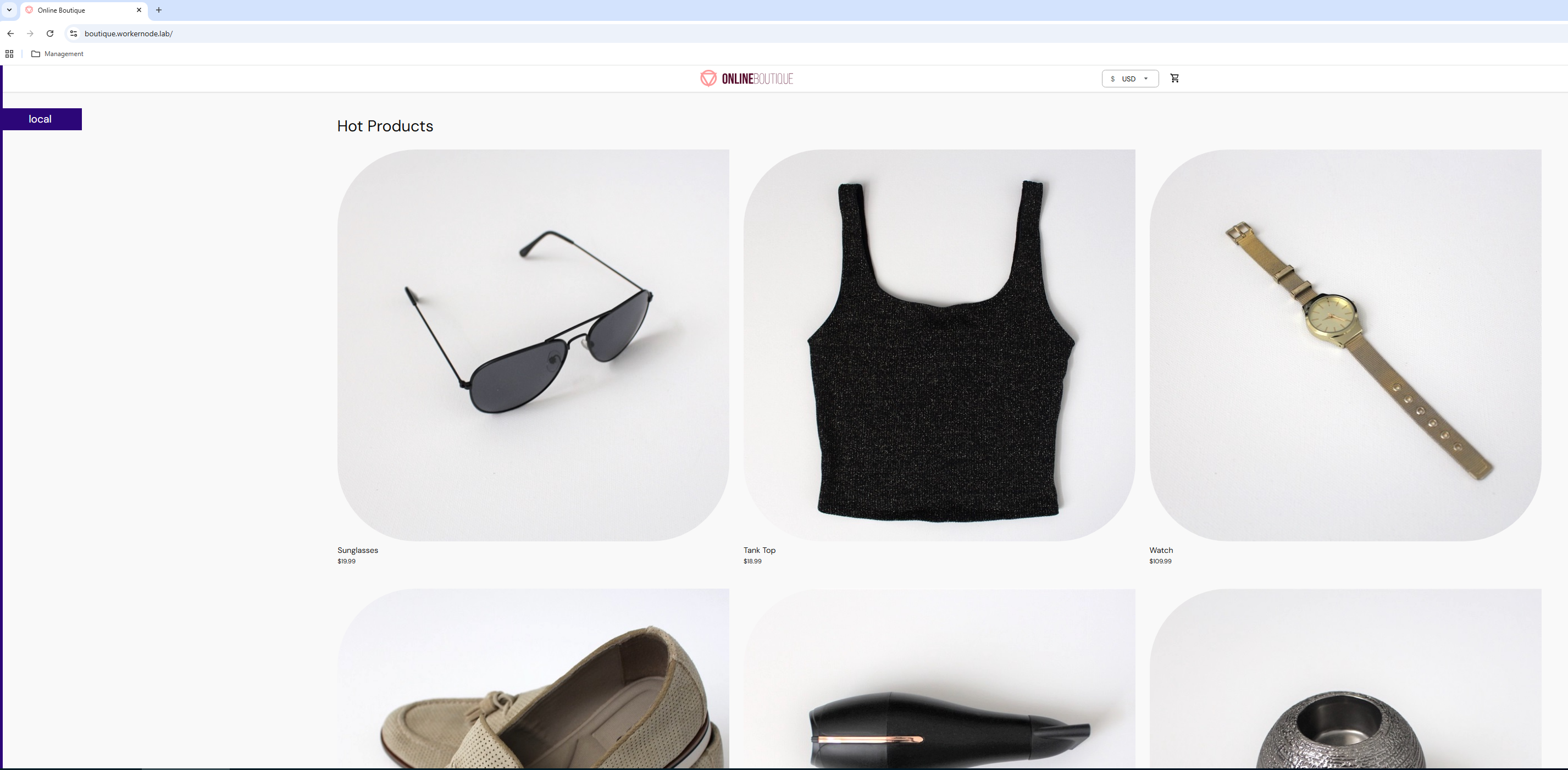
Finally, we have deployed the Demo Application a cloud-native application on vSphere Kubernetes Service, using VKS cluster provisioning, container registries, ingress setup, and secure TLS routing.
Conclusion
Deploying a microservices-based application on vSphere Kubernetes Service (VKS) highlights how modern cloud-native workloads can run seamlessly on VMware’s enterprise infrastructure. By using a Kubernetes cluster integrated with VMware Cloud Foundation, organizations can combine the agility of microservices with the reliability, scalability, and operational consistency of the vSphere platform.
In this blog, we walked through the complete deployment process—from preparing the VKS cluster and configuring access to a private Harbor registry, to deploying the Online Boutique microservices application and exposing it securely using Contour Ingress with TLS. The application itself consists of multiple loosely coupled services communicating through APIs, providing a realistic demonstration of how distributed applications operate in Kubernetes environments.
Disclaimer: All posts, contents and examples are for educational purposes in lab environments only and does not constitute professional advice. No warranty is implied or given. The user accepts that all information, contents, and opinions are my own. They do not reflect the opinions of my employe
 VMware Cloud Foundation
Leave a comment