Introduction
Harbor Registry as a Supervisor Service is a critical part of vSphere Kubernetes Service( VKS) environments. It provides a secure, enterprise-grade container image registry for Kubernetes workloads running within Supervisor Namespace.
Over time, as more container images are stored and replicated, Harbor’s storage can fill up. This can cause upload failures or registry performance issues. Fortunately, expanding the storage backing Harbor is straightforward using vSphere Cloud Native Storage (CNS) and Persistent Volume Claims (PVC).
In this guide, we’ll go step-by-step to increase the storage space of the Harbor Registry running as a Supervisor Service.
Harbor Supervisor Service Architecture
Harbor deployed as a supervisor service runs as set of Kubernetes pods within the svc-harbor-{vsphere-cluster-moref} namespace.
Its data—like container images, charts, and metadata is stored on Persistent Volumes (PV). These volumes are dynamically provisioned by vSphere CNS using a storage policy.
The PVC for Harbor Registry are :
- data-harbor-redis
- data-harbor-trivy
- database-data-harbor-database
- harbor-jobservice
- harbor-registry
Each PVC is bound to a volume in vSphere and can be resized online if the storage policy allows it.
Prerequisites
- Login Access to vSphere Supervisor as a vSphere SSO Administrator
- kubectl configured to access vSphere Supervisor Cluster
- vSphere datastore has sufficient storage capacity to support expansion
Increasing Harbor Registry Storage
- Login to Supervisor Cluster using vcf-cli
root@image-builder:/home/pj# vcf context create --endpoint 172.16.22.13 --username administrator@vsphere.local --insecure-skip-tls-verify? Provide a name for the context: supervisor[i] Auth type vSphere SSO detected. Proceeding for authentication...Provide Password:Logged in successfully.You have access to the following contexts: supervisor supervisor:svc-cci-ns-domain-c10 supervisor:svc-harbor-domain-c10 supervisor:svc-tkg-domain-c10 supervisor:svc-velero-domain-c10If the namespace context you wish to use is not in this list, you may need torefresh the context again, or contact your cluster administrator.To change context, use `vcf context use <context_name>`[ok] successfully created context: supervisor[ok] successfully created context: supervisor:svc-tkg-domain-c10[ok] successfully created context: supervisor:svc-velero-domain-c10[ok] successfully created context: supervisor:svc-cci-ns-domain-c10[ok] successfully created context: supervisor:svc-harbor-domain-c10root@image-builder:/home/pj# vcf context list NAME CURRENT TYPE supervisor false kubernetes supervisor:svc-cci-ns-domain-c10 false kubernetes supervisor:svc-harbor-domain-c10 false kubernetes supervisor:svc-tkg-domain-c10 false kubernetes supervisor:svc-velero-domain-c10 false kubernetes[i] Use '--wide' to view additional columns.root@image-builder:/home/pj# vcf context use supervisor[ok] Token is still active. Skipped the token refresh for context "supervisor"[i] Successfully activated context 'supervisor' (Type: kubernetes)[i] Fetching recommended plugins for active context 'supervisor'...[ok] All recommended plugins are already installed and up-to-date.
- Identify the Harbor Registry namespace and PV
root@image-builder:/home/pj# kubectl get ns | grep -i harborsvc-harbor-domain-c10 Active 165mroot@image-builder:/home/pj# kubectl get pv,pvc -n svc-harbor-domain-c10NAME CAPACITY ACCESS MODES RECLAIM POLICY STATUS CLAIM STORAGECLASS VOLUMEATTRIBUTESCLASS REASON AGEpersistentvolume/pvc-210e0b36-f688-4980-b262-284450fe7e64 1Gi RWO Delete Bound svc-harbor-domain-c10/database-data-harbor-database-0 thanos-vcf-cl01-optimal-datastore-default-policy-raid1 <unset> 3h7mpersistentvolume/pvc-276ee7a1-0a70-449d-ae1d-29ab7367cde6 5Gi RWO Delete Bound svc-harbor-domain-c10/data-harbor-trivy-0 thanos-vcf-cl01-optimal-datastore-default-policy-raid1 <unset> 3h7mpersistentvolume/pvc-c02e474d-6d2a-4fa3-9c2a-b0ded4e371e0 1Gi RWO Delete Bound svc-harbor-domain-c10/harbor-jobservice thanos-vcf-cl01-optimal-datastore-default-policy-raid1 <unset> 3h7mpersistentvolume/pvc-cd52d87a-8e3b-40e9-bb60-51e0739dc740 1Gi RWO Delete Bound svc-harbor-domain-c10/data-harbor-redis-0 thanos-vcf-cl01-optimal-datastore-default-policy-raid1 <unset> 3h7mpersistentvolume/pvc-da6fe1e1-4d25-4045-a3ad-f29cbae33af3 10Gi RWO Delete Bound svc-harbor-domain-c10/harbor-registry thanos-vcf-cl01-optimal-datastore-default-policy-raid1 <unset> 3h7mNAME STATUS VOLUME CAPACITY ACCESS MODES STORAGECLASS VOLUMEATTRIBUTESCLASS AGEpersistentvolumeclaim/data-harbor-redis-0 Bound pvc-cd52d87a-8e3b-40e9-bb60-51e0739dc740 1Gi RWO thanos-vcf-cl01-optimal-datastore-default-policy-raid1 <unset> 3h7mpersistentvolumeclaim/data-harbor-trivy-0 Bound pvc-276ee7a1-0a70-449d-ae1d-29ab7367cde6 5Gi RWO thanos-vcf-cl01-optimal-datastore-default-policy-raid1 <unset> 3h7mpersistentvolumeclaim/database-data-harbor-database-0 Bound pvc-210e0b36-f688-4980-b262-284450fe7e64 1Gi RWO thanos-vcf-cl01-optimal-datastore-default-policy-raid1 <unset> 3h7mpersistentvolumeclaim/harbor-jobservice Bound pvc-c02e474d-6d2a-4fa3-9c2a-b0ded4e371e0 1Gi RWO thanos-vcf-cl01-optimal-datastore-default-policy-raid1 <unset> 3h7mpersistentvolumeclaim/harbor-registry Bound pvc-da6fe1e1-4d25-4045-a3ad-f29cbae33af3 10Gi RWO thanos-vcf-cl01-optimal-datastore-default-policy-raid1 <unset> 3h7m
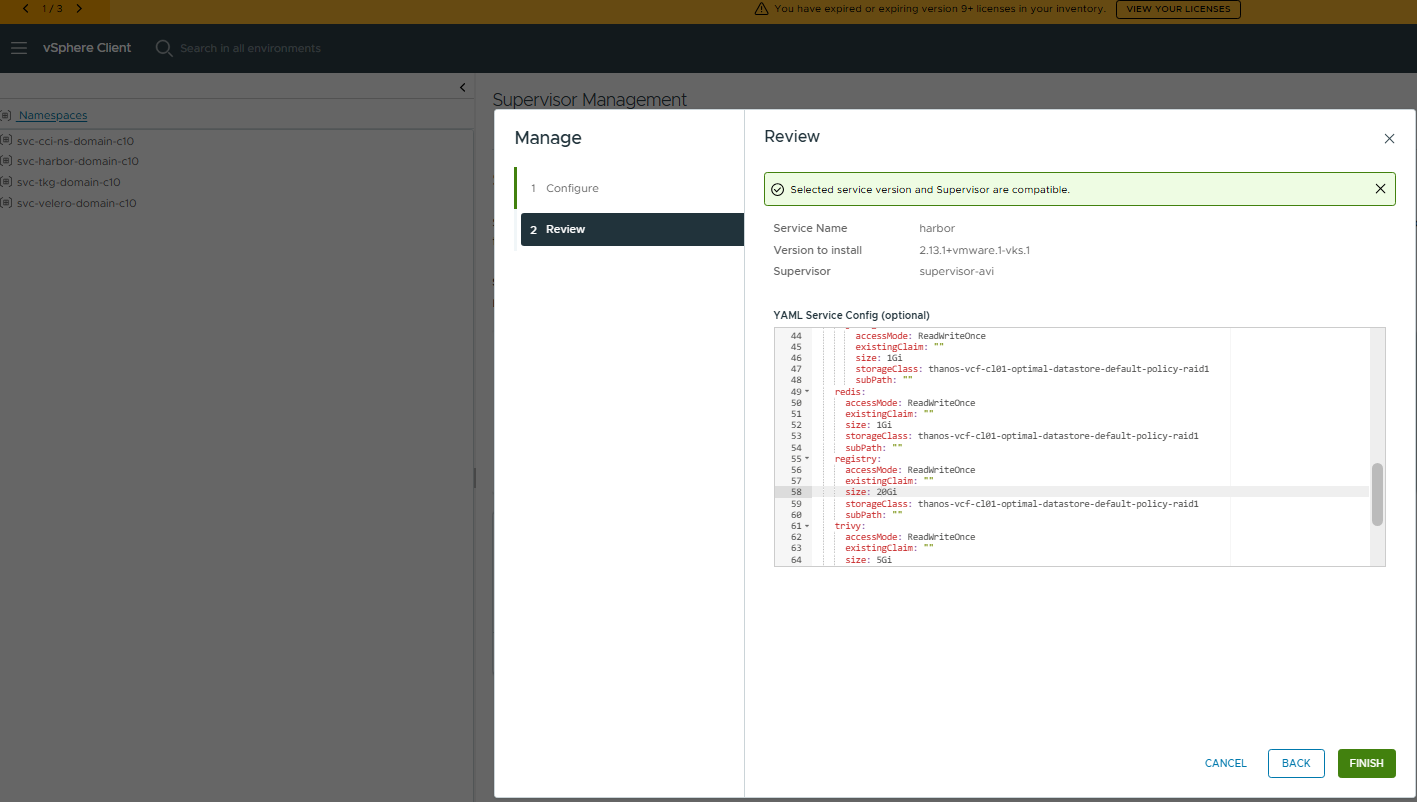
- Edit the Harbor Registry Service values.yaml directly from Supervisor Management – Services- Harbor – Manage Service . Increase the value for harbor registry PVC to the desired size and click Finish.
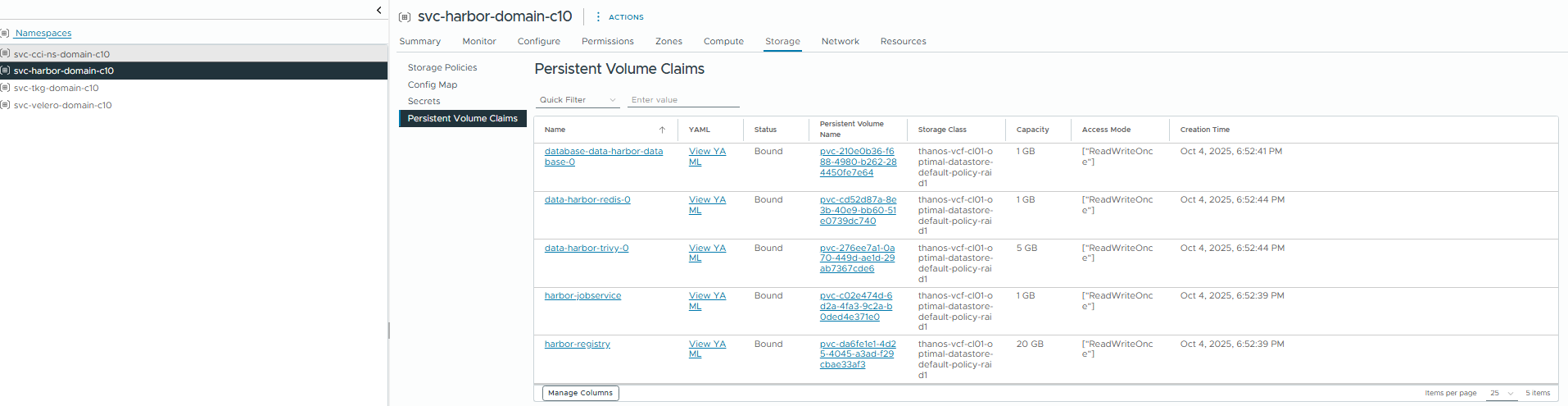
- Verify the PVC size after a few minutes . The PVC size should show increased to 20GB.
rroot@image-builder:/home/pj# kubectl get pv,pvc -n svc-harbor-domain-c10NAME CAPACITY ACCESS MODES RECLAIM POLICY STATUS CLAIM STORAGECLASS VOLUMEATTRIBUTESCLASS REASON AGEpersistentvolume/pvc-210e0b36-f688-4980-b262-284450fe7e64 1Gi RWO Delete Bound svc-harbor-domain-c10/database-data-harbor-database-0 thanos-vcf-cl01-optimal-datastore-default-policy-raid1 <unset> 172mpersistentvolume/pvc-276ee7a1-0a70-449d-ae1d-29ab7367cde6 5Gi RWO Delete Bound svc-harbor-domain-c10/data-harbor-trivy-0 thanos-vcf-cl01-optimal-datastore-default-policy-raid1 <unset> 172mpersistentvolume/pvc-c02e474d-6d2a-4fa3-9c2a-b0ded4e371e0 1Gi RWO Delete Bound svc-harbor-domain-c10/harbor-jobservice thanos-vcf-cl01-optimal-datastore-default-policy-raid1 <unset> 172mpersistentvolume/pvc-cd52d87a-8e3b-40e9-bb60-51e0739dc740 1Gi RWO Delete Bound svc-harbor-domain-c10/data-harbor-redis-0 thanos-vcf-cl01-optimal-datastore-default-policy-raid1 <unset> 172mpersistentvolume/pvc-da6fe1e1-4d25-4045-a3ad-f29cbae33af3 20Gi RWO Delete Bound svc-harbor-domain-c10/harbor-registry thanos-vcf-cl01-optimal-datastore-default-policy-raid1 <unset> 172mNAME STATUS VOLUME CAPACITY ACCESS MODES STORAGECLASS VOLUMEATTRIBUTESCLASS AGEpersistentvolumeclaim/data-harbor-redis-0 Bound pvc-cd52d87a-8e3b-40e9-bb60-51e0739dc740 1Gi RWO thanos-vcf-cl01-optimal-datastore-default-policy-raid1 <unset> 172mpersistentvolumeclaim/data-harbor-trivy-0 Bound pvc-276ee7a1-0a70-449d-ae1d-29ab7367cde6 5Gi RWO thanos-vcf-cl01-optimal-datastore-default-policy-raid1 <unset> 172mpersistentvolumeclaim/database-data-harbor-database-0 Bound pvc-210e0b36-f688-4980-b262-284450fe7e64 1Gi RWO thanos-vcf-cl01-optimal-datastore-default-policy-raid1 <unset> 172mpersistentvolumeclaim/harbor-jobservice Bound pvc-c02e474d-6d2a-4fa3-9c2a-b0ded4e371e0 1Gi RWO thanos-vcf-cl01-optimal-datastore-default-policy-raid1 <unset> 172mpersistentvolumeclaim/harbor-registry Bound pvc-da6fe1e1-4d25-4045-a3ad-f29cbae33af3 20Gi RWO thanos-vcf-cl01-optimal-datastore-default-policy-raid1 <unset> 172m
This can be verified from vSphere Client as well from Supervisor Management – Namespaces – Harbor Namespace – Storage – Persistent Volume Chains
Confirm Harbor Functionality by checking pods status and from Harbor UI.
root@image-builder:/home/pj# kubectl get pods -n svc-harbor-domain-c10NAME READY STATUS RESTARTS AGEharbor-core-5b875bf764-v7hnz 1/1 Running 1 (173m ago) 175mharbor-database-0 1/1 Running 0 175mharbor-exporter-6cb6d48f8b-hbrqk 1/1 Running 1 (173m ago) 175mharbor-jobservice-866d9b65b4-4rvxp 1/1 Running 2 (172m ago) 175mharbor-nginx-fc9754459-bcntj 1/1 Running 0 175mharbor-portal-786b4856b5-2rxfv 1/1 Running 0 175mharbor-redis-0 1/1 Running 0 175mharbor-registry-77d475b6c8-qxfnc 2/2 Running 0 175mharbor-trivy-0 1/1 Running 0 175m
By following these steps, you can safely and seamlessly expand Harbor’s registry storage without downtime or data loss.
Proactive capacity management guarantees that your Harbor Supervisor Service maintains high availability. It ensures performance and scalability for your containerized workloads on vSphere.
Conclusion
Managing storage efficiently is critical for maintaining a reliable container image registry in Kubernetes environments. As more container images, Helm charts, and security scans accumulate, the storage backing the Harbor registry can quickly grow, making it essential to expand capacity proactively to avoid upload failures or performance issues.
In this blog, we walked through the process of identifying the Harbor namespace and persistent volumes, modifying the service configuration, and increasing the size of the Harbor registry Persistent Volume Claim (PVC). With the help of vSphere Cloud Native Storage (CNS) and dynamically provisioned volumes, the storage expansion can be performed seamlessly while keeping the Harbor services running and operational.
Disclaimer: All posts, contents and examples are for educational purposes in lab environments only and does not constitute professional advice. No warranty is implied or given. The user accepts that all information, contents, and opinions are my own. They do not reflect the opinions of my employer.
 VMware Cloud Foundation
Leave a comment