Introduction
Today Enterprises have a hybrid workload mix – Linux based Cloud-native applications and Windows based .Net Framework or IIS-hosted applications. With vSphere Kubernetes Service you can provision Windows Node Pools in your vSphere Kubernetes Service (VKS) Clusters.
In this blog post I would cover
- Deployment of VKS Cluster with Windows Node Pools
- Deployment of ASP .Net Sample Application on VKS Cluster
Deployment of VKS Cluster with Windows Node Pools
Use vSphere Kubernetes Service Image Builder, earlier known as vSphere Tanzu Kubernetes Grid Image Builder for the creation of the Windows Image. I have blogged here on creation of Windows Images.
Prerequisites:
- Create a Local Content Library on the vCenter Server and upload the Windows OVA to the content library. The Item Name has to match the ova name.
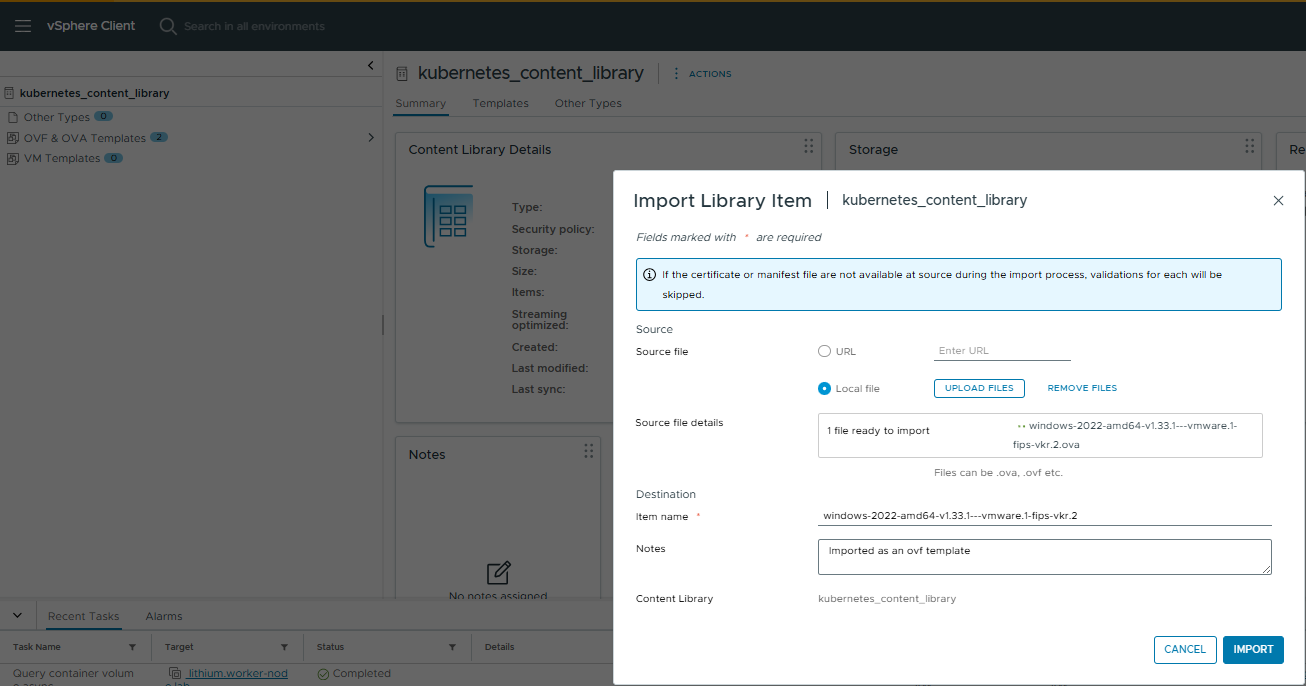
- Download the Photon or Ubuntu OVA for your control plane nodes from Broadcom Subscribed Content Library. Then, upload it to the same content library.
- Create a vSphere namespace in vCenter Server.
- Give user-permissions, storage policy, vm class and attach the local content library to the vSphere namespace.
VKS Cluster Creation
- Login to vSphere Supervisor
vcf context create --endpoint 172.16.22.10 --username administrator@vsphere.local --insecure-skip-tls-verify
- Switch context to vSphere namespace . I would be using vSphere namespace – veeam for this VKS Cluster.
root@terraform-machine:~# vcf context list NAME CURRENT TYPE supervisor false kubernetes supervisor:svc-tkg-domain-c10 false kubernetes supervisor:svc-velero-domain-c10 false kubernetes supervisor:veeam false kubernetesroot@terraform-machine:~# vcf context use supervisor:veeam[ok] Token is still active. Skipped the token refresh for context "supervisor:veeam"[i] Successfully activated context 'supervisor:veeam' (Type: kubernetes)[i] Fetching recommended plugins for active context 'supervisor:veeam'...[ok] All recommended plugins are already installed and up-to-date.
- Verify the osimage and cluster virtualmachine images shows correctly on the vSphere namespace
root@terraform-machine:/home/pj/terraform/yaml# kubectl get osimage,cvmiNAME K8S VERSION OS NAME OS VERSION ARCH TYPE COMPATIBLE CREATEDosimage.run.tanzu.vmware.com/vmi-8d9fbe3b896399d54 v1.33.1+vmware.1-fips windows 2022 amd64 cvmi 3h21mosimage.run.tanzu.vmware.com/vmi-c01f717d20e3689d9 v1.33.1+vmware.1-fips ubuntu 22.04 amd64 cvmi 3h21mNAME DISPLAY NAME TYPE IMAGE VERSION OS NAME OS VERSION HARDWARE VERSIONclustervirtualmachineimage.vmoperator.vmware.com/vmi-8d9fbe3b896399d54 windows-2022-amd64-v1.33.1---vmware.1-fips-vkr.2 OVF v1.33.1+vmware.1-fips-vkr.2 windows2019srvNext_64Guest 18clustervirtualmachineimage.vmoperator.vmware.com/vmi-c01f717d20e3689d9 ubuntu-2204-amd64-v1.33.1---vmware.1-fips-vkr.2 OVF v1.33.1+vmware.1-fips-vkr.2 ubuntu64Guest
- Verify VKS Cluster Yaml
root@terraform-machine:/home/pj/terraform/yaml# cat windows-cluster.yamlapiVersion: cluster.x-k8s.io/v1beta1kind: Clustermetadata: name: windows-cluster-1 namespace: veeamspec: clusterNetwork: pods: cidrBlocks: - 192.168.156.0/20 services: cidrBlocks: - 10.96.0.0/12 serviceDomain: cluster.local topology: class: builtin-generic-v3.3.0 version: v1.33.1+vmware.1-fips-vkr.2 variables: - name: vsphereOptions value: persistentVolumes: defaultStorageClass: marvel-cl01-optimal-datastore-default-policy-raid1 - name: kubernetes value: certificateRotation: enabled: true renewalDaysBeforeExpiry: 90 security: podSecurityStandard: audit: restricted auditVersion: latest enforce: privileged enforceVersion: latest warn: privileged warnVersion: latest - name: osConfiguration value: ntp: servers: - 172.16.9.1 - name: vmClass value: guaranteed-xsmall - name: storageClass value: marvel-cl01-optimal-datastore-default-policy-raid1 controlPlane: replicas: 1 metadata: annotations: run.tanzu.vmware.com/resolve-os-image: os-name=ubuntu workers: machineDeployments: - class: node-pool name: veeam-windows replicas: 1 metadata: annotations: run.tanzu.vmware.com/resolve-os-image: os-name=windows variables: overrides: - name: volumes value: - name: vol-5lo8 mountPath: C:\var\lib\kubelet storageClass: marvel-cl01-optimal-datastore-default-policy-raid1 capacity: 50Gi - name: vol-diqs mountPath: C:\ProgramData\containerd storageClass: marvel-cl01-optimal-datastore-default-policy-raid1 capacity: 50Gi
- Deploy VKS Cluster . The above yaml deploys 1 Ubuntu control plane node and 1 Windows 2022 worker node.
root@terraform-machine:/home/pj/terraform/yaml# kubectl apply -f windows-cluster.yamlcluster.cluster.x-k8s.io/windows-cluster-1 created
- Wait for the VKS Cluster deployment to finish and the cluster to show in ready state
root@terraform-machine:/home/pj/terraform/yaml# kubectl get cluster -ANAMESPACE NAME CLUSTERCLASS PHASE AGE VERSIONveeam windows-cluster-1 builtin-generic-v3.4.0 Provisioned 153m v1.33.1+vmware.1-fips
- Once the cluster is in ready state , login to the VKS Cluster
vcf context create --endpoint 172.16.22.10 --username administrator@vsphere.local --insecure-skip-tls-verify --workload-cluster-name windows-cluster-1 --workload-cluster-namespace veeam
- Switch to cluster context and verify the cluster nodes
root@terraform-machine:~# vcf context list NAME CURRENT TYPE windows-cluster-1 false kubernetes windows-cluster-1:windows-cluster-1 true kubernetes[i] Use '--wide' to view additional columns.root@terraform-machinr:~# vcf context use windows-cluster-1:windows-cluster-1[ok] Token is still active. Skipped the token refresh for context "windows-cluster-1:windows-cluster-1"[i] Successfully activated context 'windows-cluster-1:windows-cluster-1' (Type: kubernetes)[i] Fetching recommended plugins for active context 'windows-cluster-1:windows-cluster-1'...[ok] No recommended plugins found.root@terraform-machine:/home/pj/terraform/yaml# kubectl get nodes -o wideNAME STATUS ROLES AGE VERSION INTERNAL-IP EXTERNAL-IP OS-IMAGE KERNEL-VERSION CONTAINER-RUNTIMEwindows-cluster-1-stmsd-h9pbn Ready control-plane 157m v1.33.1+vmware.1-fips 172.16.24.14 <none> Ubuntu 22.04.5 LTS 5.15.0-141-generic containerd://2.0.5+vmware.2-fipswindows-cluster-1-veeam-windows-r2kdg-6cc4v-6p4vr Ready <none> 153m v1.33.1+vmware.1-fips 172.16.24.13 <none> Windows Server 2022 Datacenter 10.0.20348.3328 containerd://2.0.5+vmware.2-fipsroot@terraform-machine:/home/pj/terraform/yaml# kubectl get nsNAME STATUS AGEdefault Active 157mkube-node-lease Active 157mkube-public Active 157mkube-system Active 157msample-application Active 83msecretgen-controller Active 156mtkg-system Active 156mvelero-vsphere-plugin-backupdriver Active 157mvmware-system-antrea Active 156mvmware-system-auth Active 156mvmware-system-cloud-provider Active 157mvmware-system-csi Active 157mvmware-system-tkg Active 157m
At this stage our cluster is ready for application deployment.
Deployment of a .Net Sample Application on VKS Cluster
I created a namespace sample-deployment for deployment of a sample ASP .Net Application on VKS cluster using the below yaml.
I am using nodeselectors to ensure the pods are scheduled on Windows Nodes only.
root@terraform-machine:/home/pj/yaml# kubectl create ns sample-applicationroot@terraform-machine:~# kubectl get ns sample-applicationNAME STATUS AGEsample-application Active 91mroot@terraform-machine:/home/pj/yaml# cat windows-sample-application.yamlapiVersion: apps/v1kind: Deploymentmetadata: name: sample namespace: sample-application labels: app: samplespec: replicas: 1 template: metadata: name: sample labels: app: sample spec: nodeSelector: kubernetes.io/os: windows tolerations: - key: "os" operator: "Equal" value: "windows" effect: "NoSchedule" containers: - name: sample image: mcr.microsoft.com/dotnet/framework/samples:aspnetapp resources: limits: cpu: 1 memory: 800M requests: cpu: .1 memory: 300M ports: - containerPort: 80 selector: matchLabels: app: sample---apiVersion: v1kind: Servicemetadata: name: sample namespace: sample-applicationspec: type: LoadBalancer ports: - protocol: TCP port: 80 selector: app: sample
- Apply the yaml file for this deployment which would expose the service as load-balancer.
root@terraform-machine:/home/pj/yaml# kubectl apply -f /home/pj/yaml/windows-sample-application.yamldeployment.apps/sample createdservice/sample created
- Verify pods for the deployment . The image can take some time to pull from the public registry.
root@terraform-machine:~# kubectl get pods -ANAMESPACE NAME READY STATUS RESTARTS AGEkube-system antrea-agent-windows-wfnbl 2/2 Running 0 69mkube-system antrea-agent-zr5x9 2/2 Running 0 72mkube-system antrea-controller-6f656ffff5-g2k4t 1/1 Running 0 72mkube-system coredns-79dff89d76-7f6r2 1/1 Running 0 71mkube-system coredns-79dff89d76-d9q46 1/1 Running 0 73mkube-system csi-proxy-4npph 1/1 Running 0 69mkube-system etcd-windows-cluster-1-stmsd-h9pbn 1/1 Running 0 73mkube-system kube-apiserver-windows-cluster-1-stmsd-h9pbn 1/1 Running 0 73mkube-system kube-controller-manager-windows-cluster-1-stmsd-h9pbn 1/1 Running 0 73mkube-system kube-proxy-sd4gb 1/1 Running 0 73mkube-system kube-scheduler-windows-cluster-1-stmsd-h9pbn 1/1 Running 0 73mkube-system metrics-server-7c5b57844-22474 1/1 Running 0 72mkube-system snapshot-controller-7869cd78db-cfk8d 1/1 Running 0 72msample-application sample-54fccbcb65-xd99m 0/1 ContainerCreating 0 2ssecretgen-controller secretgen-controller-699786b9bd-52dds 1/1 Running 0 72mtkg-system kapp-controller-65d5b74f8c-qb76b 2/2 Running 0 72mvmware-system-antrea antrea-pre-upgrade-job-hv8r5 0/1 Completed 0 72mvmware-system-auth guest-cluster-auth-svc-svbcj 1/1 Running 0 72mvmware-system-cloud-provider guest-cluster-cloud-provider-955cdd46-qflxz 1/1 Running 0 72mvmware-system-csi vsphere-csi-controller-dc879dbb-2pxdk 7/7 Running 0 72mvmware-system-csi vsphere-csi-node-4hpxk 3/3 Running 3 (71m ago) 72mvmware-system-csi vsphere-csi-node-windows-rw8w8 3/3 Running 3 (68m ago) 69mroot@terraform-machine:~# kubectl describe pod sample-54fccbcb65-xd99m -n sample-applicationName: sample-54fccbcb65-xd99mNamespace: sample-applicationPriority: 0Service Account: defaultNode: windows-cluster-1-veeam-windows-r2kdg-6cc4v-6p4vr/172.16.24.13Start Time: Sat, 20 Sep 2025 19:31:35 +0000Labels: app=sample pod-template-hash=54fccbcb65Annotations: <none>Status: PendingIP:IPs: <none>Controlled By: ReplicaSet/sample-54fccbcb65Containers: sample: Container ID: Image: mcr.microsoft.com/dotnet/framework/samples:aspnetapp Image ID: Port: 80/TCP Host Port: 0/TCP State: Waiting Reason: ContainerCreating Ready: False Restart Count: 0 Limits: cpu: 1 memory: 800M Requests: cpu: 100m memory: 300M Environment: <none> Mounts: /var/run/secrets/kubernetes.io/serviceaccount from kube-api-access-d5t5r (ro)Conditions: Type Status PodReadyToStartContainers False Initialized True Ready False ContainersReady False PodScheduled TrueVolumes: kube-api-access-d5t5r: Type: Projected (a volume that contains injected data from multiple sources) TokenExpirationSeconds: 3607 ConfigMapName: kube-root-ca.crt Optional: false DownwardAPI: trueQoS Class: BurstableNode-Selectors: kubernetes.io/os=windowsTolerations: node.kubernetes.io/not-ready:NoExecute op=Exists for 300s node.kubernetes.io/unreachable:NoExecute op=Exists for 300s os=windows:NoScheduleEvents: Type Reason Age From Message ---- ------ ---- ---- ------- Normal Scheduled 14s default-scheduler Successfully assigned sample-application/sample-54fccbcb65-xd99m to windows-cluster-1-veeam-windows-r2kdg-6cc4v-6p4vr Normal NetworkReady 13s AntreaPodConfigurator Installed Pod network forwarding rules Normal Pulling 13s kubelet Pulling image "mcr.microsoft.com/dotnet/framework/samples:aspnetapp"
- Wait for some time for the pods to get in ready state . Verify the External LB IP for the application that we just deployed.
root@terraform-machine:~# kubectl get svc -n sample-applicationNAME TYPE CLUSTER-IP EXTERNAL-IP PORT(S) AGEsample LoadBalancer 10.97.115.73 172.16.22.16 80:31073/TCP 99m
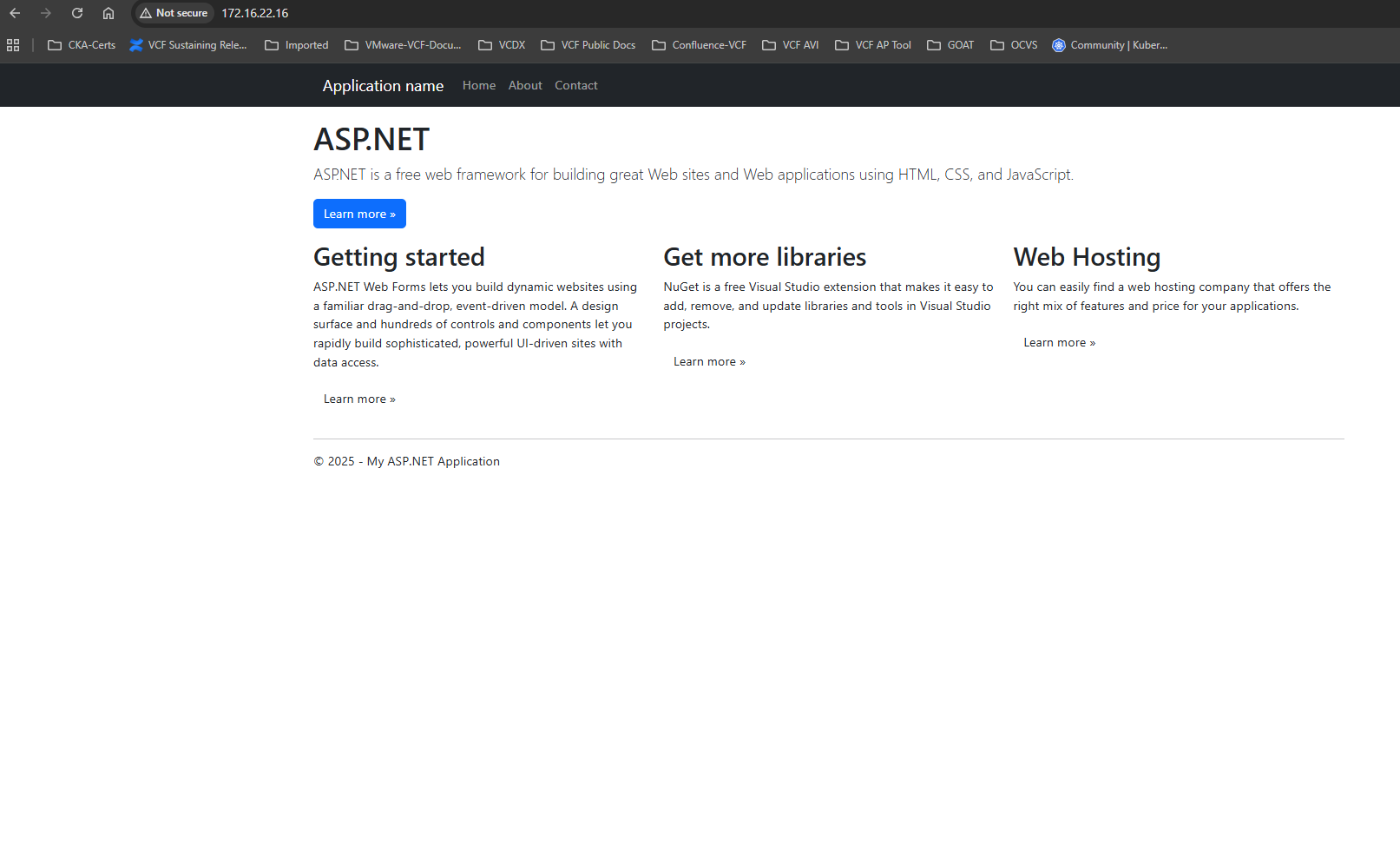
Open a web browser and access the application. using the LB IP.
You should see the below page on successful deployment.
Conclusion
Deploying Windows node pools in vSphere Kubernetes Service (VKS) enables organizations to run both Linux- and Windows-based workloads on the same Kubernetes platform. This capability is especially valuable for enterprises that rely on Windows-based applications such as ASP.NET or legacy .NET Framework workloads while still adopting modern containerized architectures.
In this blog, we walked through the complete workflow—from preparing the required Windows image and publishing it to a vCenter Content Library, to deploying a VKS cluster with both Linux control plane nodes and Windows worker nodes. We also demonstrated how to schedule workloads specifically on Windows nodes using Kubernetes selectors and successfully deployed a sample ASP.NET application to validate the setup.
By integrating Windows node pools into VKS clusters, platform teams can modernize traditional Windows applications without requiring a full rewrite to Linux-based containers. This approach allows organizations to adopt Kubernetes while maintaining compatibility with existing enterprise workloads. With the cluster successfully deployed and validated, teams can now extend the platform to run additional Windows containerized services, microservices, and hybrid workloads on their vSphere-based Kubernetes infrastructure.
Disclaimer: All posts, contents and examples are for educational purposes in lab environments only and does not constitute professional advice. No warranty is implied or given. The user accepts that all information, contents, and opinions are my own. They do not reflect the opinions of my employer.
 VMware Cloud Foundation
Leave a comment