Introduction
VMware Cloud Foundation (VCF) provides a IaaS Platform that delivers software-defined compute, storage, networking, security, and management
By using Terraform, you can automate the deployment of VCF, making the process faster, more reliable, and easier to repeat.
In this blog I’ll take you step-by-step through the process of deploying a VCF instance using Terraform.
The steps to deploy a VCF instance would include
- VCF Installer Deployment
- VCF Bundles Download
- VCF Instance Creation
Terraform Installation
Terraform does not have many system dependencies or prerequisites but you need to make sure you have the following
- A system running Ubuntu 22.04 or later
- A user account with sudo privileges to install software
- Internet access to download Terraform and dependencies
Step 1 : Update Ubuntu
First, it’s always a good practice to update your system to ensure you have the latest packages and security patches. Open a terminal window and run the command
sudo apt update && sudo apt upgrade -y
Step 2 : Install Terraform
Run the below command on a terminal window which would install Terraform on the computer
wget -O - https://apt.releases.hashicorp.com/gpg | sudo gpg --dearmor -o /usr/share/keyrings/hashicorp-archive-keyring.gpgecho "deb [arch=$(dpkg --print-architecture) signed-by=/usr/share/keyrings/hashicorp-archive-keyring.gpg] https://apt.releases.hashicorp.com $(lsb_release -cs) main" | sudo tee /etc/apt/sources.list.d/hashicorp.listsudo apt update && sudo apt install terraform
Reference – https://developer.hashicorp.com/terraform/install
Step 3 : Verify Terraform Installation
After installation, verify that Terraform was successfully installed by checking its version. Run the command:
terraform --version
You should a output like this
Terraform v1.13.2on linux_amd64
VCF Installer Deployment
VCF Installer is a single virtual appliance that deploys and configures all the required VCF components.
This appliance is necessary to create a VCF Instance. All product binaries are downloaded on it for deploying VCF.
The first step would be to setup vSphere Provider in providers.tf file required for deployment of VCF Installer.
providers.tf
### Required Provider for VCF Installer Deploymentterraform { required_providers { vsphere = { source = "vmware/vsphere" } }}### vSphere Configurationprovider "vsphere" { user = var.vsphere_user password = var.vsphere_password vsphere_server = var.vsphere_server allow_unverified_ssl = true api_timeout = 10}
The next step would be to set up all variables required for VCF Installer. These variables would be declared in the variables.tf file.
variables.tf
 variable "vsphere_server" {
  type = string
}
variable "vsphere_user" {
  type = string
}
variable "vsphere_password" {
  type = string
}
variable "vmware_datacenter" {
  type = string
}
variable "vsphere_cluster" {
  type = string
}
variable "datastore" {
  type = string
}
variable "management_network" {
  type = string
}
variable "esxi_host" {
  type = string
}
variable "vcf_installer_host_name" {
  type = string
}
variable "local_ova_path" {
  type = string
}
variable "root_password" {
  type = string
}
variable "vcf_user_password" {
  type = string
}
variable "ntp_server" {
  type = string
}
variable "vcf_installer_ip" {
  type = string
}
variable "vcf_installer_netmask" {
  type = string
}
variable "vcf_installer_gateway" {
  type = string
}
variable "vcf_installer_dns_search_path" {
  type = string
}
variable "dns_server" {
  type = string
}
All values for the variables would be configured in terraform.tfvars.
terraform.tfvars
#username and passwords for setupvsphere_server = "vc-1.vrack.net"vsphere_user = "administrator@vsphere.local"vsphere_password = "VMware1!"vmware_datacenter = "LS-DC"vsphere_cluster = "Cluster-1"datastore = "DS"management_network = "VM Network"esxi_host = "10.0.0.119"vcf_installer_host_name = "installer.vrack.net"local_ova_path = "/home/ubuntu/pj/ova/VCF-SDDC-Manager-Appliance-9.0.0.0.24703748.ova"root_password = "VMware123!VMware123!"vcf_user_password = "VMware123!VMware123!"ntp_server = "10.0.0.250"vcf_installer_ip = "10.0.0.4"vcf_installer_netmask = "255.255.252.0"vcf_installer_gateway = "10.0.0.250"vcf_installer_dns_search_path = "vrack.net"dns_server = "10.0.0.250"
The main.tf file for creation of VCF Installer virtual machine.
main.tf
## Data source for vCenter Datacenterdata "vsphere_datacenter" "datacenter" { name = var.vmware_datacenter}## Data source for vCenter Clusterdata "vsphere_compute_cluster" "cluster" { name = var.vsphere_cluster datacenter_id = data.vsphere_datacenter.datacenter.id}## Data source for vCenter Datastoredata "vsphere_datastore" "datastore" { name = var.datastore datacenter_id = data.vsphere_datacenter.datacenter.id}## Data source for vCenter Portgroupdata "vsphere_network" "management_network" { name = var.management_network datacenter_id = data.vsphere_datacenter.datacenter.id}## Data source for ESXi host to deploy todata "vsphere_host" "host" { name = var.esxi_host datacenter_id = data.vsphere_datacenter.datacenter.id}data "vsphere_resource_pool" "pool" { name = format("%s%s", data.vsphere_compute_cluster.cluster.name, "/Resources") datacenter_id = data.vsphere_datacenter.datacenter.id}## Data source for the OVF to read the required OVF Propertiesdata "vsphere_ovf_vm_template" "ovfLocal" { name = var.vcf_installer_host_name datastore_id = data.vsphere_datastore.datastore.id host_system_id = data.vsphere_host.host.id resource_pool_id = data.vsphere_resource_pool.pool.id local_ovf_path = var.local_ova_path allow_unverified_ssl_cert = true ovf_network_map = { "Network 1" = data.vsphere_network.management_network.id }}resource "vsphere_virtual_machine" "sddc-manager" { name = var.vcf_installer_host_name datacenter_id = data.vsphere_datacenter.datacenter.id datastore_id = data.vsphere_ovf_vm_template.ovfLocal.datastore_id host_system_id = data.vsphere_host.host.id resource_pool_id = data.vsphere_resource_pool.pool.id num_cpus = data.vsphere_ovf_vm_template.ovfLocal.num_cpus num_cores_per_socket = data.vsphere_ovf_vm_template.ovfLocal.num_cores_per_socket memory = data.vsphere_ovf_vm_template.ovfLocal.memory guest_id = data.vsphere_ovf_vm_template.ovfLocal.guest_id scsi_type = data.vsphere_ovf_vm_template.ovfLocal.scsi_type dynamic "network_interface" { for_each = data.vsphere_ovf_vm_template.ovfLocal.ovf_network_map content { network_id = network_interface.value } } wait_for_guest_net_timeout = 5 wait_for_guest_ip_timeout = 5 ovf_deploy { allow_unverified_ssl_cert = true local_ovf_path = data.vsphere_ovf_vm_template.ovfLocal.local_ovf_path disk_provisioning = "thin" ovf_network_map = data.vsphere_ovf_vm_template.ovfLocal.ovf_network_map } vapp { properties = { "ROOT_PASSWORD" = var.root_password "LOCAL_USER_PASSWORD" = var.vcf_user_password "vami.hostname" = var.vcf_installer_host_name "guestinfo.ntp" = var.ntp_server "ip0" = var.vcf_installer_ip "netmask0" = var.vcf_installer_netmask "gateway" = var.vcf_installer_gateway "domain" = var.vcf_installer_host_name "searchpath" = var.vcf_installer_dns_search_path "DNS" = var.dns_server } } lifecycle { ignore_changes = [ #vapp # Enable this to ignore all vapp properties if the plan is re-run vapp[0].properties["ROOT_PASSWORD"], # Avoid unwanted changes to specific vApp properties. vapp[0].properties["LOCAL_USER_PASSWORD"], ] }}
Install the provider plugin by running the command terraform init
oot@terraform:/home/ubuntu/terraform/vcf_install# terraform initInitializing the backend...Initializing provider plugins...- Finding latest version of vmware/vsphere...- Installing vmware/vsphere v2.15.0...- Installed vmware/vsphere v2.15.0 (signed by a HashiCorp partner, key ID ED13BE650293896B)Partner and community providers are signed by their developers.If you'd like to know more about provider signing, you can read about it here:https://developer.hashicorp.com/terraform/cli/plugins/signingTerraform has created a lock file .terraform.lock.hcl to record the providerselections it made above. Include this file in your version control repositoryso that Terraform can guarantee to make the same selections by default whenyou run "terraform init" in the future.Terraform has been successfully initialized!You may now begin working with Terraform. Try running "terraform plan" to seeany changes that are required for your infrastructure. All Terraform commandsshould now work.If you ever set or change modules or backend configuration for Terraform,rerun this command to reinitialize your working directory. If you forget, othercommands will detect it and remind you to do so if necessary.
Format the terraform files by running terraform fmt
root@terraform:/home/ubuntu/terraform/vcf_install# terraform fmtprovider.tf
Review the terraform execution plan by running terraform plan
root@terraform:/home/ubuntu/terraform/vcf_install# terraform plandata.vsphere_datacenter.datacenter: Reading...data.vsphere_datacenter.datacenter: Read complete after 0s [id=datacenter-3]data.vsphere_network.management_network: Reading...data.vsphere_datastore.datastore: Reading...data.vsphere_host.host: Reading...data.vsphere_compute_cluster.cluster: Reading...data.vsphere_network.management_network: Read complete after 0s [id=dvportgroup-27]data.vsphere_datastore.datastore: Read complete after 0s [id=datastore-1090]data.vsphere_host.host: Read complete after 0s [id=host-14]data.vsphere_compute_cluster.cluster: Read complete after 0s [id=domain-c11]data.vsphere_resource_pool.pool: Reading...data.vsphere_resource_pool.pool: Read complete after 0s [id=resgroup-12]data.vsphere_ovf_vm_template.ovfLocal: Reading...data.vsphere_ovf_vm_template.ovfLocal: Read complete after 0s [id=hydrogen.worker-node.lab]Terraform used the selected providers to generate the following execution plan. Resource actions are indicated with the following symbols: + createTerraform will perform the following actions: # vsphere_virtual_machine.sddc-manager will be created + resource "vsphere_virtual_machine" "sddc-manager" { + annotation = (known after apply) + boot_retry_delay = 10000 + change_version = (known after apply) + cpu_limit = -1 + cpu_share_count = (known after apply) + cpu_share_level = "normal" + datacenter_id = "datacenter-3" + datastore_id = "datastore-1090" + default_ip_address = (known after apply) + ept_rvi_mode = (known after apply) + extra_config_reboot_required = true + firmware = "bios" + force_power_off = true + guest_id = "vmwarePhoton64Guest" + guest_ip_addresses = (known after apply) + hardware_version = (known after apply) + host_system_id = "host-14" + hv_mode = (known after apply) + id = (known after apply) + ide_controller_count = 2 + imported = (known after apply) + latency_sensitivity = "normal" + memory = 16384 + memory_limit = -1 + memory_share_count = (known after apply) + memory_share_level = "normal" + migrate_wait_timeout = 30 + moid = (known after apply) + name = "hydrogen.worker-node.lab" + num_cores_per_socket = 0 + num_cpus = 4 + nvme_controller_count = 0 + power_state = (known after apply) + poweron_timeout = 300 + reboot_required = (known after apply) + resource_pool_id = "resgroup-12" + run_tools_scripts_after_power_on = true + run_tools_scripts_after_resume = true + run_tools_scripts_before_guest_shutdown = true + run_tools_scripts_before_guest_standby = true + sata_controller_count = 0 + scsi_bus_sharing = "noSharing" + scsi_controller_count = 1 + scsi_type = "lsilogic" + shutdown_wait_timeout = 3 + storage_policy_id = (known after apply) + swap_placement_policy = "inherit" + sync_time_with_host = true + tools_upgrade_policy = "manual" + uuid = (known after apply) + vapp_transport = (known after apply) + vmware_tools_status = (known after apply) + vmx_path = (known after apply) + wait_for_guest_ip_timeout = 5 + wait_for_guest_net_routable = true + wait_for_guest_net_timeout = 5 + disk (known after apply) + network_interface { + adapter_type = "vmxnet3" + bandwidth_limit = -1 + bandwidth_reservation = 0 + bandwidth_share_count = (known after apply) + bandwidth_share_level = "normal" + device_address = (known after apply) + key = (known after apply) + mac_address = (known after apply) + network_id = "dvportgroup-27" } + ovf_deploy { + allow_unverified_ssl_cert = true + disk_provisioning = "thin" + enable_hidden_properties = false + local_ovf_path = "/home/ubuntu/pj/ova/VCF-SDDC-Manager-Appliance-9.0.0.0.24703748.ova" + ovf_network_map = { + "Network 1" = "dvportgroup-27" } } + vapp { + properties = { + "DNS" = "172.16.9.1" + "LOCAL_USER_PASSWORD" = "VMware123!VMware123!" + "ROOT_PASSWORD" = "VMware123!VMware123!" + "domain" = "hydrogen.worker-node.lab" + "gateway" = "172.16.10.1" + "guestinfo.ntp" = "172.16.9.1" + "ip0" = "172.16.10.20" + "netmask0" = "255.255.254.0" + "searchpath" = "worker-node.lab" + "vami.hostname" = "hydrogen.worker-node.lab" } } }Plan: 1 to add, 0 to change, 0 to destroy.────────────────────────────────────────────────────────────────────────────────────────────────────────────────────────────────────────────────────────────────Note: You didn't use the -out option to save this plan, so Terraform can't guarantee to take exactly these actions if you run "terraform apply" now.root@terraform:/home/ubuntu/terraform/vcf_install#
Run terraform apply –auto-approve to execute the terraform code. This command will start the deployment of the VCF Installer appliance on the vCenter Server.
root@terraform:/home/ubuntu/terraform/vcf_install# terraform apply -auto-approvedata.vsphere_datacenter.datacenter: Reading...data.vsphere_datacenter.datacenter: Read complete after 0s [id=datacenter-3]data.vsphere_host.host: Reading...data.vsphere_compute_cluster.cluster: Reading...data.vsphere_datastore.datastore: Reading...data.vsphere_network.management_network: Reading...data.vsphere_network.management_network: Read complete after 0s [id=dvportgroup-27]data.vsphere_host.host: Read complete after 0s [id=host-14]data.vsphere_datastore.datastore: Read complete after 0s [id=datastore-1090]data.vsphere_compute_cluster.cluster: Read complete after 0s [id=domain-c11]data.vsphere_resource_pool.pool: Reading...data.vsphere_resource_pool.pool: Read complete after 0s [id=resgroup-12]data.vsphere_ovf_vm_template.ovfLocal: Reading...data.vsphere_ovf_vm_template.ovfLocal: Read complete after 0s [id=hydrogen.worker-node.lab]Terraform used the selected providers to generate the following execution plan. Resource actions are indicated with the following symbols: + createTerraform will perform the following actions: # vsphere_virtual_machine.sddc-manager will be created
VCF Bundles Download
Login to the VCF Installer Appliance using the username – admin@local and password set during installation .
VCF Downloads are now authenticated so get the download token for your account from support.broadcom.com . Steps for generating a download token are available at KB – 390098 .
Set up Download Token in Depot Management to download VCF Binaries/bundles from Broadcom Portal.
Post setting up the token in VCF Installer you should all the product bundles in VCF Installer Page.
Select all and click on download.
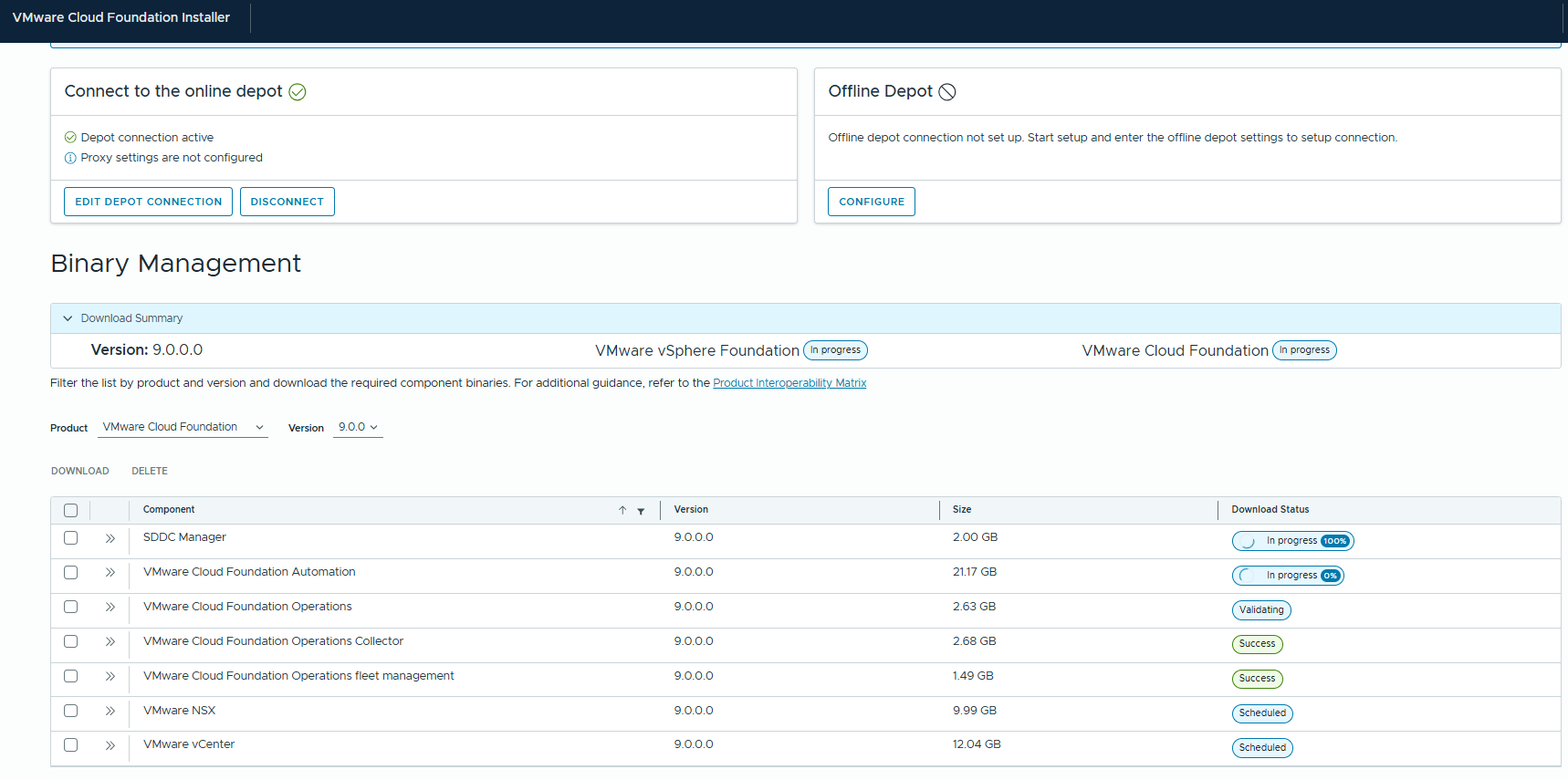
All bundles should be downloaded successfully prior for VCF Instance creation.
VCF Instance Creation
For VCF Instance Creation the first step would be to the setup the VCF Provider in provider.tf.
### Required Provider for VCF Instance Creation terraform { required_providers { vcf = { source = "vmware/vcf" } }}provider "vcf" { installer_host = var.installer_host installer_username = var.installer_username installer_password = var.installer_password allow_unverified_tls = var.allow_unverified_tls}
The next step would be to set up all variables required for VCF and these would be declared in variables.tf file.
variables.tf
variable "installer_host" { type = string}variable "installer_username" { type = string}variable "installer_password" { type = string}variable "allow_unverified_tls" { type = string}variable "instance_id" { type = string}variable "esx_thumbprint_validation" { type = string}variable "mgmt_network_pool" { type = string}variable "ceip_flag" { type = string}variable "vcf_version" { type = string}variable "sddc_manager_hostname" { type = string}variable "vcf_root_password" { type = string}variable "vcf_ssh_password" { type = string}variable "vcf_local_user_password" { type = string}variable "ntp_server" { type = list(string)}variable "dns_domain_name" { type = string}variable "primary_dns_server" { type = string}variable "management_network_subnet" { type = string}variable "management_network_vlan" { type = string}variable "management_network_mtu" { type = string}variable "management_network_type" { type = string}variable "management_network_gateway" { type = string}variable "management_network_uplinks" { type = list(string)}variable "vmotion_network_subnet" { type = string}variable "vmotion_network_vlan" { type = string}variable "vmotion_network_mtu" { type = string}variable "vmotion_network_type" { type = string}variable "vmotion_network_gateway" { type = string}variable "vmotion_network_uplinks" { type = list(string)}variable "vmotion_ip_address_range_ip_start" { type = string}variable "vmotion_ip_address_range_ip_end" { type = string}variable "vsan_network_subnet" { type = string}variable "vsan_network_vlan" { type = string}variable "vsan_network_mtu" { type = string}variable "vsan_network_type" { type = string}variable "vsan_network_gateway" { type = string}variable "vsan_network_uplinks" { type = list(string)}variable "vsan_ip_address_range_ip_start" { type = string}variable "vsan_ip_address_range_ip_end" { type = string}variable "nsx_manager_size" { type = string}variable "nsx_manager_hostname" { type = string}variable "nsx_manager_root_password" { type = string}variable "nsx_manager_admin_password" { type = string}variable "nsx_manager_audit_password" { type = string}variable "vsan_datastore_name" { type = string}variable "vsan_esa_flag" { type = string}variable "vsan_dedup_flag" { type = string}variable "vsan_ftt" { type = string}variable "management_dvs_name" { type = string}variable "management_dvs_mtu" { type = string}variable "dvs_first_vmnic_name" { type = string}variable "dvs_first_uplink_name" { type = string}variable "management_datacenter" { type = string}variable "management_cluster" { type = string}variable "vcenter_hostname" { type = string}variable "vcenter_root_password" { type = string}variable "vcenter_vm_size" { type = string}variable "automation_hostname" { type = string}variable "automation_internal_cidr" { type = string}variable "automation_ip_pool" { type = list(string)}variable "automation_admin_password" { type = string}variable "automation_node_prefix" { type = string}variable "operations_hostname" { type = string}variable "operations_node_type" { type = string}variable "operations_root_user_password" { type = string}variable "operations_collector_hostname" { type = string}variable "operations_collector_node_size" { type = string}variable "operations_fleet_management_hostname" { type = string}variable "operations_fleet_management_root_user_password" { type = string}variable "operations_fleet_management_admin_user_password" { type = string}variable "operations_admin_password" { type = string}variable "operations_appliance_size" { type = string}variable "management_domain_esxi_host_1" { type = string}variable "management_domain_esxi_host_2" { type = string}variable "management_domain_esxi_host_3" { type = string}variable "management_domain_esxi_host_1_ssl_thumbprint" { type = string}variable "management_domain_esxi_host_2_ssl_thumbprint" { type = string}variable "management_domain_esxi_host_3_ssl_thumbprint" { type = string}variable "esxi_host_user_name" { type = string}variable "esxi_host_password" { type = string}variable "teaming_policy" { type = string}variable "nsx_manager_vip_fqdn" { type = string}variable "nsx_transport_vlan" { type = string}variable "nsx_teaming_policy" { type = string}variable "nsx_active_uplinks" { type = list(string)}variable "host_switch_operational_mode" { type = string}variable "vlan_transport_zone_type" { type = string}variable "overlay_transport_zone_type" { type = string}variable "vlan_transport_zone" { type = string}variable "overlay_transport_zone" { type = string}
All values for the variables would be configured in terraform.tfvars.
terraform.tfvars
#username and passwords for setupinstaller_host = "hydrogen.worker-node.lab"installer_username = "admin@local"installer_password = "VMware123!VMware123!"allow_unverified_tls = "true"instance_id = "thanos"mgmt_network_pool = "thanos-mgmt-np01"ceip_flag = "false"esx_thumbprint_validation = "true"vcf_version = "9.0.0.0"sddc_manager_hostname = "hydrogen.worker-node.lab"vcf_root_password = "VMware123!VMware123!"vcf_ssh_password = "VMware123!VMware123!"vcf_local_user_password = "VMware123!VMware123!"ntp_server = ["172.16.9.1"]dns_domain_name = "worker-node.lab"primary_dns_server = "172.16.9.1"management_network_subnet = "172.16.10.0/23"management_network_vlan = "10"management_network_mtu = "9000"management_network_type = "MANAGEMENT"management_network_gateway = "172.16.10.1"management_network_uplinks = ["uplink1"]vmotion_network_subnet = "172.16.12.0/24"vmotion_network_vlan = "12"vmotion_network_mtu = "9000"vmotion_network_type = "VMOTION"vmotion_network_gateway = "172.16.12.1"vmotion_network_uplinks = ["uplink1"]vmotion_ip_address_range_ip_start = "172.16.12.10"vmotion_ip_address_range_ip_end = "172.16.12.20"vsan_network_subnet = "172.16.14.0/24"vsan_network_vlan = "14"vsan_network_mtu = "9000"vsan_network_type = "VSAN"vsan_network_gateway = "172.16.14.1"vsan_network_uplinks = ["uplink1"]vsan_ip_address_range_ip_start = "172.16.14.10"vsan_ip_address_range_ip_end = "172.16.14.20"teaming_policy = "loadbalance_loadbased"nsx_manager_size = "medium"nsx_manager_hostname = "nitrogen.worker-node.lab"nsx_manager_root_password = "VMware123!VMware123!"nsx_manager_admin_password = "VMware123!VMware123!"nsx_manager_audit_password = "VMware123!VMware123!"nsx_manager_vip_fqdn = "carbon.worker-node.lab"nsx_transport_vlan = "16"vsan_datastore_name = "marvel-vsan-ds"vsan_esa_flag = "true"vsan_dedup_flag = "false"vsan_ftt = "1"management_dvs_name = "marvel-cl01-vds"management_dvs_mtu = "9000"dvs_first_vmnic_name = "vmnic0"dvs_first_uplink_name = "uplink1"nsx_teaming_policy = "LOADBALANCE_SRCID"nsx_active_uplinks = ["uplink1"]host_switch_operational_mode = "ENS_INTERRUPT"vlan_transport_zone_type = "VLAN"overlay_transport_zone_type = "OVERLAY"vlan_transport_zone = "marvel-vlan-transport-zone"overlay_transport_zone = "marvel-overlay-transport-zone"management_datacenter = "marvel-dc"management_cluster = "marvel-cl01"vcenter_hostname = "lithium.worker-node.lab"vcenter_root_password = "VMware123!VMware123!"vcenter_vm_size = "small"automation_hostname = "sodium.worker-node.lab"automation_internal_cidr = "198.18.0.0/15"automation_ip_pool = ["172.16.10.240", "172.16.10.241"]automation_admin_password = "VMware123!VMware123!"automation_node_prefix = "vcf"operations_hostname = "magnesium.worker-node.lab"operations_node_type = "master"operations_root_user_password = "VMware123!VMware123!"operations_collector_hostname = "zinc.worker-node.lab"operations_collector_node_size = "small"operations_fleet_management_hostname = "calcium.worker-node.lab"operations_fleet_management_root_user_password = "VMware123!VMware123!"operations_fleet_management_admin_user_password = "VMware123!VMware123!"operations_admin_password = "VMware123!VMware123!"operations_appliance_size = "small"management_domain_esxi_host_1 = "mercury.worker-node.lab"management_domain_esxi_host_2 = "venus.worker-node.lab"management_domain_esxi_host_3 = "earth.worker-node.lab"management_domain_esxi_host_1_ssl_thumbprint = "DC:17:EF:D6:50:22:61:52:FB:D5:39:9A:7C:86:1E:B1:D6:0B:65:0F:52:20:FB:03:F7:F6:8C:55:C4:45:F4:70"management_domain_esxi_host_2_ssl_thumbprint = "E5:E8:F5:58:ED:32:C7:D2:92:9A:1C:7C:36:49:09:67:9C:E7:7B:E6:15:A9:00:1A:F4:C3:FC:AE:E3:09:70:16"management_domain_esxi_host_3_ssl_thumbprint = "3E:6B:38:73:73:0D:FE:2F:FD:3E:25:9E:94:64:27:C9:EE:81:F5:2B:25:37:08:CF:ED:96:47:9D:A8:99:9E:3F"esxi_host_user_name = "root"esxi_host_password = "VMware123!VMware123!"
The main.tf file to start the deployment of VCF Instance.
main.tf
resource "vcf_instance" "sddc_mgmt_domain" { instance_id = var.instance_id management_pool_name = var.mgmt_network_pool skip_esx_thumbprint_validation = var.esx_thumbprint_validation ceip_enabled = var.ceip_flag version = var.vcf_version sddc_manager { hostname = var.sddc_manager_hostname root_user_password = var.vcf_root_password ssh_password = var.vcf_ssh_password local_user_password = var.vcf_local_user_password } ntp_servers = var.ntp_server dns { domain = var.dns_domain_name name_server = var.primary_dns_server } network { subnet = var.management_network_subnet vlan_id = var.management_network_vlan mtu = var.management_network_mtu network_type = var.management_network_type gateway = var.management_network_gateway active_uplinks = var.management_network_uplinks teaming_policy = var.teaming_policy } network { subnet = var.vmotion_network_subnet vlan_id = var.vmotion_network_vlan mtu = var.vmotion_network_mtu network_type = var.vmotion_network_type gateway = var.vmotion_network_gateway active_uplinks = var.vmotion_network_uplinks teaming_policy = var.teaming_policy include_ip_address_ranges { start_ip_address = var.vmotion_ip_address_range_ip_start end_ip_address = var.vmotion_ip_address_range_ip_end } } network { subnet = var.vsan_network_subnet vlan_id = var.vsan_network_vlan mtu = var.vsan_network_mtu network_type = var.vsan_network_type gateway = var.vsan_network_gateway active_uplinks = var.vsan_network_uplinks teaming_policy = var.teaming_policy include_ip_address_ranges { start_ip_address = var.vsan_ip_address_range_ip_start end_ip_address = var.vsan_ip_address_range_ip_end } } nsx { nsx_manager_size = var.nsx_manager_size nsx_manager { hostname = var.nsx_manager_hostname } root_nsx_manager_password = var.nsx_manager_root_password nsx_admin_password = var.nsx_manager_admin_password nsx_audit_password = var.nsx_manager_audit_password vip_fqdn = var.nsx_manager_vip_fqdn transport_vlan_id = var.nsx_transport_vlan } vsan { datastore_name = var.vsan_datastore_name esa_enabled = var.vsan_esa_flag vsan_dedup = var.vsan_dedup_flag failures_to_tolerate = var.vsan_ftt } dvs { dvs_name = var.management_dvs_name mtu = var.management_dvs_mtu vmnic_mapping { vmnic = var.dvs_first_vmnic_name uplink = var.dvs_first_uplink_name } networks = [ "MANAGEMENT", "VSAN", "VMOTION" ] nsx_teaming { policy = var.nsx_teaming_policy active_uplinks = var.nsx_active_uplinks } nsxt_switch_config { host_switch_operational_mode = var.host_switch_operational_mode transport_zones { name = var.vlan_transport_zone transport_type = var.vlan_transport_zone_type } transport_zones { name = var.overlay_transport_zone transport_type = var.overlay_transport_zone_type } } } cluster { datacenter_name = var.management_datacenter cluster_name = var.management_cluster } vcenter { vcenter_hostname = var.vcenter_hostname root_vcenter_password = var.vcenter_root_password vm_size = var.vcenter_vm_size } automation { hostname = var.automation_hostname internal_cluster_cidr = var.automation_internal_cidr ip_pool = var.automation_ip_pool admin_user_password = var.automation_admin_password node_prefix = var.automation_node_prefix } operations { admin_user_password = var.operations_admin_password appliance_size = var.operations_appliance_size node { hostname = var.operations_hostname type = var.operations_node_type root_user_password = var.operations_root_user_password } } operations_collector { hostname = var.operations_collector_hostname appliance_size = var.operations_collector_node_size root_user_password = var.operations_root_user_password } operations_fleet_management { hostname = var.operations_fleet_management_hostname root_user_password = var.operations_fleet_management_root_user_password admin_user_password = var.operations_fleet_management_admin_user_password } host { hostname = var.management_domain_esxi_host_1 credentials { username = var.esxi_host_user_name password = var.esxi_host_password } ssl_thumbprint = var.management_domain_esxi_host_1_ssl_thumbprint } host { hostname = var.management_domain_esxi_host_2 credentials { username = var.esxi_host_user_name password = var.esxi_host_password } ssl_thumbprint = var.management_domain_esxi_host_2_ssl_thumbprint } host { hostname = var.management_domain_esxi_host_3 credentials { username = var.esxi_host_user_name password = var.esxi_host_password } ssl_thumbprint = var.management_domain_esxi_host_3_ssl_thumbprint }}
Install the provider plugin by running the command terraform init
root@terraform-machine:/home/pj/terraform/vcfinstaller# terraform initInitializing the backend...Initializing provider plugins...- Finding latest version of vmware/vcf...- Installing vmware/vcf v0.17.1...- Installed vmware/vcf v0.17.1 (signed by a HashiCorp partner, key ID ED13BE650293896B)Partner and community providers are signed by their developers.If you'd like to know more about provider signing, you can read about it here:https://developer.hashicorp.com/terraform/cli/plugins/signingTerraform has created a lock file .terraform.lock.hcl to record the providerselections it made above. Include this file in your version control repositoryso that Terraform can guarantee to make the same selections by default whenyou run "terraform init" in the future.
Format the terraform files by running terraform fmt
root@terraform-machine:/home/pj/terraform/vcfinstaller# terraform fmtmain.tfproviders.tf
Review the terraform execution plan by running terraform plan
root@terraform-machine:/home/pj/terraform/vcfinstaller# terraform planTerraform used the selected providers to generate the following execution plan. Resource actions are indicated with the following symbols: + createTerraform will perform the following actions: # vcf_instance.sddc_mgmt_domain will be created + resource "vcf_instance" "sddc_mgmt_domain" { + ceip_enabled = false + creation_timestamp = (known after apply) + id = (known after apply) + instance_id = "thanos" + management_pool_name = "thanos-mgmt-np01" + ntp_servers = [ + "172.16.9.1", ] + skip_esx_thumbprint_validation = true + status = (known after apply) + version = "9.0.0.0" + automation { + admin_user_password = (sensitive value) + hostname = "sodium.worker-node.lab" + internal_cluster_cidr = "198.18.0.0/15" + ip_pool = [ + "172.16.10.240", + "172.16.10.241", ] + node_prefix = "vcf" } + cluster { + cluster_name = "marvel-cl01" + datacenter_name = "marvel-dc" } + dns { + domain = "worker-node.lab" + name_server = "172.16.9.1" } + dvs { + dvs_name = "marvel-cl01-vds" + mtu = 9000 + networks = [ + "MANAGEMENT", + "VSAN", + "VMOTION", ] + nsx_teaming { + active_uplinks = [ + "uplink1", ] + policy = "LOADBALANCE_SRCID" } + nsxt_switch_config { + host_switch_operational_mode = "ENS_INTERRUPT" + transport_zones { + name = "marvel-vlan-transport-zone" + transport_type = "VLAN" } + transport_zones { + name = "marvel-overlay-transport-zone" + transport_type = "OVERLAY" } } + vmnic_mapping { + uplink = "uplink1" + vmnic = "vmnic0" } } + host { + hostname = "mercury.worker-node.lab" + ssl_thumbprint = "DC:17:EF:D6:50:22:61:52:FB:D5:39:9A:7C:86:1E:B1:D6:0B:65:0F:52:20:FB:03:F7:F6:8C:55:C4:45:F4:70" + credentials { + password = "VMware123!VMware123!" + username = "root" } } + host { + hostname = "venus.worker-node.lab" + ssl_thumbprint = "E5:E8:F5:58:ED:32:C7:D2:92:9A:1C:7C:36:49:09:67:9C:E7:7B:E6:15:A9:00:1A:F4:C3:FC:AE:E3:09:70:16" + credentials { + password = "VMware123!VMware123!" + username = "root" } } + host { + hostname = "earth.worker-node.lab" + ssl_thumbprint = "3E:6B:38:73:73:0D:FE:2F:FD:3E:25:9E:94:64:27:C9:EE:81:F5:2B:25:37:08:CF:ED:96:47:9D:A8:99:9E:3F" + credentials { + password = "VMware123!VMware123!" + username = "root" } } + network { + active_uplinks = [ + "uplink1", ] + gateway = "172.16.10.1" + mtu = 9000 + network_type = "MANAGEMENT" + subnet = "172.16.10.0/23" + teaming_policy = "loadbalance_loadbased" + vlan_id = 10 } + network { + active_uplinks = [ + "uplink1", ] + gateway = "172.16.12.1" + mtu = 9000 + network_type = "VMOTION" + subnet = "172.16.12.0/24" + teaming_policy = "loadbalance_loadbased" + vlan_id = 12 + include_ip_address_ranges { + end_ip_address = "172.16.12.20" + start_ip_address = "172.16.12.10" } } + network { + active_uplinks = [ + "uplink1", ] + gateway = "172.16.14.1" + mtu = 9000 + network_type = "VSAN" + subnet = "172.16.14.0/24" + teaming_policy = "loadbalance_loadbased" + vlan_id = 14 + include_ip_address_ranges { + end_ip_address = "172.16.14.20" + start_ip_address = "172.16.14.10" } } + nsx { + nsx_admin_password = (sensitive value) + nsx_audit_password = (sensitive value) + nsx_manager_size = "medium" + root_nsx_manager_password = (sensitive value) + transport_vlan_id = 16 + vip_fqdn = "carbon.worker-node.lab" + nsx_manager { + hostname = "nitrogen.worker-node.lab" } } + operations { + admin_user_password = (sensitive value) + appliance_size = "small" + node { + hostname = "magnesium.worker-node.lab" + root_user_password = (sensitive value) + type = "master" } } + operations_collector { + appliance_size = "small" + hostname = "calcium.worker-node.lab" + root_user_password = (sensitive value) } + operations_fleet_management { + admin_user_password = (sensitive value) + hostname = "lcm.worker-node.lab" + root_user_password = (sensitive value) } + sddc_manager { + hostname = "hydrogen.worker-node.lab" + local_user_password = "VMware123!VMware123!" + root_user_password = "VMware123!VMware123!" + ssh_password = "VMware123!VMware123!" } + vcenter { + root_vcenter_password = (sensitive value) + vcenter_hostname = "lithium.worker-node.lab" + vm_size = "small" } + vsan { + datastore_name = "marvel-vsan-ds" + esa_enabled = true + failures_to_tolerate = 1 + vsan_dedup = false } }Plan: 1 to add, 0 to change, 0 to destroy.───────────────────────────────────────────────────────────────────────────────────────────────────────────────────────────────────────────────────────────────────────────────────────────────────────────Note: You didn't use the -out option to save this plan, so Terraform can't guarantee to take exactly these actions if you run "terraform apply" now.
Execute the terraform code by running terraform apply –auto-approve which would start the creation of VCF Instance.
root@terraform-machine:/home/pj/terraform/vcfinstaller# terraform apply -auto-approveTerraform used the selected providers to generate the following execution plan. Resource actions are indicated with the following symbols: + createTerraform will perform the following actions: # vcf_instance.sddc_mgmt_domain will be created + resource "vcf_instance" "sddc_mgmt_domain" {
Review the progress for VCF Deployment in VCF Installer Appliance UI.
The deployment took 3-4 hours in my home lab to finish the VCF deployment. Hopefully, it takes less time in your environment.
vcf_instance.sddc_mgmt_domain: Still creating... [192m14s elapsed]vcf_instance.sddc_mgmt_domain: Still creating... [192m24s elapsed]vcf_instance.sddc_mgmt_domain: Still creating... [192m34s elapsed]vcf_instance.sddc_mgmt_domain: Creation complete after 3h12m36s [id=7630a521-a2b3-4087-a35e-724d66471728]Apply complete! Resources: 1 added, 0 changed, 0 destroyed.

Conclusion
Automating the deployment of a VMware Cloud Foundation instance with Terraform brings the power of infrastructure-as-code to one of the most comprehensive private cloud platforms available today. Instead of relying solely on manual configuration through multiple interfaces, Terraform allows administrators to define the required infrastructure components, configuration parameters, and deployment workflow in a consistent and repeatable way.
In this blog, we walked through the key steps required to deploy a VCF instance using Terraform—from preparing prerequisites and configuring providers to defining the required variables and executing the deployment workflow. By codifying the deployment process, infrastructure teams can significantly reduce manual effort, accelerate environment provisioning, and maintain greater consistency across development, test, and production environments.
Disclaimer: All posts, contents and examples are for educational purposes in lab environments only and does not constitute professional advice. No warranty is implied or given. The user accepts that all information, contents, and opinions are my own. They do not reflect the opinions of my employer.
 VMware Cloud Foundation
Leave a comment