
Introduction
Modern enterprises demand high availability, disaster recovery, and streamlined infrastructure operations especially when running mission-critical Kubernetes workloads. vSphere Kubernetes Service brings Kubernetes natively to vSphere. Combining it with a vSAN Stretched Cluster ensures business continuity even during site-level failures.
In this blog, we explain how to deploy vSphere Supervisor on a vSAN Stretched Cluster. This setup enables Kubernetes workloads to survive failures across datacenter sites.
Prerequisites
The vSphere Environment being used for this deployment is on vSphere 8.0 U3 with both vCenter Server & ESXi Hosts on 8.0 U3e release.
Additionally, I have deployed AVI Controller 22.1.7 as I am utilizing vDS Networking in this environment.
The setup comprises 2 vSAN hosts in each site. I would call them Site-A and Site-B, respectively. Site-A would form the primary site. Site-B would form the secondary site for my vSAN Stretched Cluster Deployment.
vSAN Stretched Cluster
- Two active sites (Site A and Site B) with vSAN-ready hosts.
- A third site for the vSAN Witness Appliance.
- Bandwidth between Data sites must be at least 10Gbps and the latency has to be less than or equal to (≤ 5ms) RTT
- Network links between Data sites can be layer 2 or layer3.
- Network link between Data sites and the Witness site needs to layer 3
Note – vSphere Supervisor greenfield deployment is only supported on vSAN Stretched Cluster. If you have deployed vSphere Supervisor on a non-stretched vSAN Cluster, you cannot change the supervisor deployment to run on a vSAN stretched cluster.
vSAN Stretched Cluster Configuration
In vSphere Client:
- Go to vSAN > Configure > Fault Domains.
- Verify:
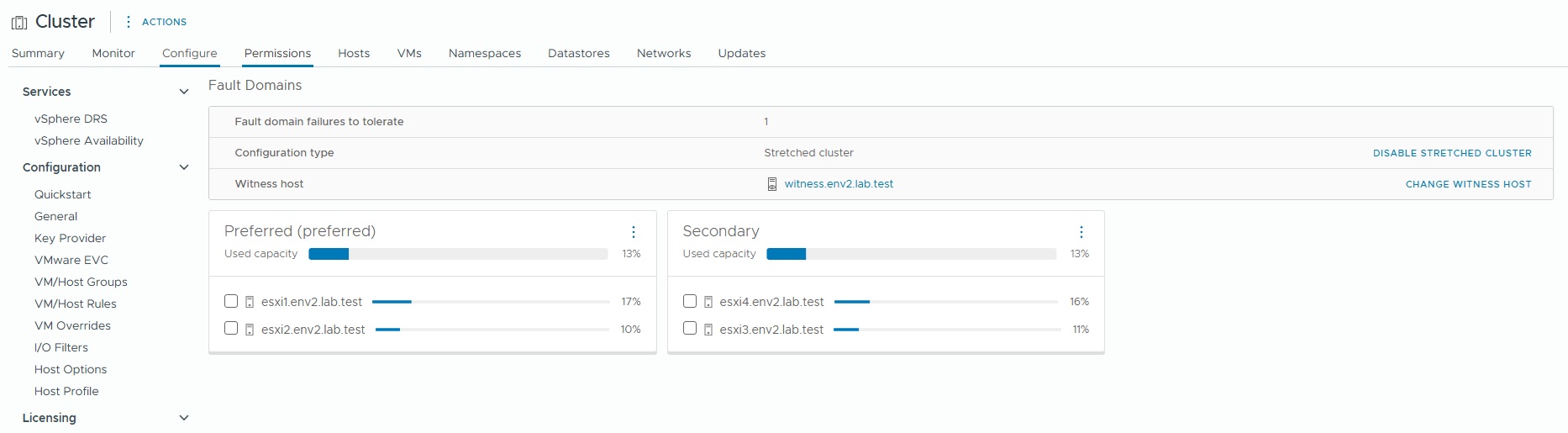
- Check vSAN Health from Skyline Health Tab and ensure there are no errors/alerts on the vSAN Cluster
- Command esxcli vsan health cluster list provides the health of vSAN cluster directly from the ESXi Host
[root@esxi1:~] esxcli vsan health cluster listHealth Test Name Status-------------------------------------------------- ------Overall health findings green (OK)Cluster green Advanced vSAN configuration in sync green vSAN daemon liveness green vSAN Disk Balance green Resync operations throttling green Software version compatibility green Disk format version greenNetwork green Hosts with connectivity issues green vSAN cluster partition green All hosts have a vSAN vmknic configured green vSAN: Basic (unicast) connectivity check green vSAN: MTU check (ping with large packet size) green vMotion: Basic (unicast) connectivity check green vMotion: MTU check (ping with large packet size) greenData green vSAN object health green vSAN object format health greenStretched cluster green Site latency health greenCapacity utilization green Storage space green Cluster and host component utilization green What if the most consumed host fails greenPhysical disk green Operation health green Congestion green Physical disk component utilization green Component metadata health green Memory pools (heaps) green Memory pools (slabs) green Disk capacity greenPerformance service green Stats DB object green Stats primary election green Performance data collection green All hosts contributing stats green Stats DB object conflicts green
- Additionally you can run esxcli vsan cluster get and esxcli vsan faultdomain get to review the vSAN Cluster configuration
Primary Site Hosts [root@esxi1:~] esxcli vsan cluster getCluster Information Enabled: true Current Local Time: 2025-06-04T18:22:06Z Local Node UUID: 683971d3-e30b-ed7f-86f6-000c2963141e Local Node Type: NORMAL Local Node State: MASTER Local Node Health State: HEALTHY Sub-Cluster Master UUID: 683971d3-e30b-ed7f-86f6-000c2963141e Sub-Cluster Backup UUID: 6839759a-96a6-05b5-2e0d-000c29ef2d8e Sub-Cluster UUID: 52726012-51d7-b646-3906-8cdb88d4cc89 Sub-Cluster Membership Entry Revision: 3 Sub-Cluster Member Count: 5 Sub-Cluster Member UUIDs: 683971d3-e30b-ed7f-86f6-000c2963141e, 6839759a-96a6-05b5-2e0d-000c29ef2d8e, 68397301-4474-15bd-ac11-000c29d6edfa, 68397255-ea1d-e4ed-9c63-000c2995cb55, 6839762d-9263-a031-18ae-000c2939b50d Sub-Cluster Member HostNames: esxi1.env2.lab.test, esxi4.env2.lab.test, esxi3.env2.lab.test, esxi2.env2.lab.test, witness.env2.lab.test Sub-Cluster Membership UUID: 31294068-ee31-5959-0a77-000c2963141e Unicast Mode Enabled: true Maintenance Mode State: OFF Config Generation: a498cac9-3aad-426d-8180-3c22756f2d9d 7 2025-06-04T12:12:01.610 Mode: REGULAR vSAN ESA Enabled: false[root@esxi1:~] esxcli vsan faultdomain get Fault Domain Id: a054ccb4-ff68-4c73-cbc2-d272d45e32df Fault Domain Name: Preferred[root@esxi2:~] esxcli vsan cluster getCluster Information Enabled: true Current Local Time: 2025-06-04T18:22:28Z Local Node UUID: 68397255-ea1d-e4ed-9c63-000c2995cb55 Local Node Type: NORMAL Local Node State: AGENT Local Node Health State: HEALTHY Sub-Cluster Master UUID: 683971d3-e30b-ed7f-86f6-000c2963141e Sub-Cluster Backup UUID: 6839759a-96a6-05b5-2e0d-000c29ef2d8e Sub-Cluster UUID: 52726012-51d7-b646-3906-8cdb88d4cc89 Sub-Cluster Membership Entry Revision: 3 Sub-Cluster Member Count: 5 Sub-Cluster Member UUIDs: 683971d3-e30b-ed7f-86f6-000c2963141e, 6839759a-96a6-05b5-2e0d-000c29ef2d8e, 68397301-4474-15bd-ac11-000c29d6edfa, 68397255-ea1d-e4ed-9c63-000c2995cb55, 6839762d-9263-a031-18ae-000c2939b50d Sub-Cluster Member HostNames: esxi1.env2.lab.test, esxi4.env2.lab.test, esxi3.env2.lab.test, esxi2.env2.lab.test, witness.env2.lab.test Sub-Cluster Membership UUID: 31294068-ee31-5959-0a77-000c2963141e Unicast Mode Enabled: true Maintenance Mode State: OFF Config Generation: a498cac9-3aad-426d-8180-3c22756f2d9d 7 2025-06-04T12:12:01.608 Mode: REGULAR vSAN ESA Enabled: false[root@esxi2:~] esxcli vsan faultdomain get Fault Domain Id: a054ccb4-ff68-4c73-cbc2-d272d45e32df Fault Domain Name: Preferred[root@esxi2:~]Secondary Site Hosts [root@esxi3:~] esxcli vsan cluster getCluster Information Enabled: true Current Local Time: 2025-06-04T18:22:30Z Local Node UUID: 68397301-4474-15bd-ac11-000c29d6edfa Local Node Type: NORMAL Local Node State: AGENT Local Node Health State: HEALTHY Sub-Cluster Master UUID: 683971d3-e30b-ed7f-86f6-000c2963141e Sub-Cluster Backup UUID: 6839759a-96a6-05b5-2e0d-000c29ef2d8e Sub-Cluster UUID: 52726012-51d7-b646-3906-8cdb88d4cc89 Sub-Cluster Membership Entry Revision: 3 Sub-Cluster Member Count: 5 Sub-Cluster Member UUIDs: 683971d3-e30b-ed7f-86f6-000c2963141e, 6839759a-96a6-05b5-2e0d-000c29ef2d8e, 68397301-4474-15bd-ac11-000c29d6edfa, 68397255-ea1d-e4ed-9c63-000c2995cb55, 6839762d-9263-a031-18ae-000c2939b50d Sub-Cluster Member HostNames: esxi1.env2.lab.test, esxi4.env2.lab.test, esxi3.env2.lab.test, esxi2.env2.lab.test, witness.env2.lab.test Sub-Cluster Membership UUID: 31294068-ee31-5959-0a77-000c2963141e Unicast Mode Enabled: true Maintenance Mode State: OFF Config Generation: a498cac9-3aad-426d-8180-3c22756f2d9d 7 2025-06-04T12:12:01.596 Mode: REGULAR vSAN ESA Enabled: false[root@esxi3:~] esxcli vsan faultdomain get Fault Domain Id: 0c7d6cf1-9426-e01d-cfa3-2434828ed266 Fault Domain Name: Secondary[root@esxi4:~] esxcli vsan cluster getCluster Information Enabled: true Current Local Time: 2025-06-04T18:22:32Z Local Node UUID: 6839759a-96a6-05b5-2e0d-000c29ef2d8e Local Node Type: NORMAL Local Node State: BACKUP Local Node Health State: HEALTHY Sub-Cluster Master UUID: 683971d3-e30b-ed7f-86f6-000c2963141e Sub-Cluster Backup UUID: 6839759a-96a6-05b5-2e0d-000c29ef2d8e Sub-Cluster UUID: 52726012-51d7-b646-3906-8cdb88d4cc89 Sub-Cluster Membership Entry Revision: 3 Sub-Cluster Member Count: 5 Sub-Cluster Member UUIDs: 683971d3-e30b-ed7f-86f6-000c2963141e, 6839759a-96a6-05b5-2e0d-000c29ef2d8e, 68397301-4474-15bd-ac11-000c29d6edfa, 68397255-ea1d-e4ed-9c63-000c2995cb55, 6839762d-9263-a031-18ae-000c2939b50d Sub-Cluster Member HostNames: esxi1.env2.lab.test, esxi4.env2.lab.test, esxi3.env2.lab.test, esxi2.env2.lab.test, witness.env2.lab.test Sub-Cluster Membership UUID: 31294068-ee31-5959-0a77-000c2963141e Unicast Mode Enabled: true Maintenance Mode State: OFF Config Generation: a498cac9-3aad-426d-8180-3c22756f2d9d 7 2025-06-04T12:12:01.607 Mode: REGULAR vSAN ESA Enabled: false[root@esxi4:~] esxcli vsan faultdomain get Fault Domain Id: 0c7d6cf1-9426-e01d-cfa3-2434828ed266 Fault Domain Name: Secondary
- vSAN Stretched Cluster Storage Policy for vSphere Supervisor
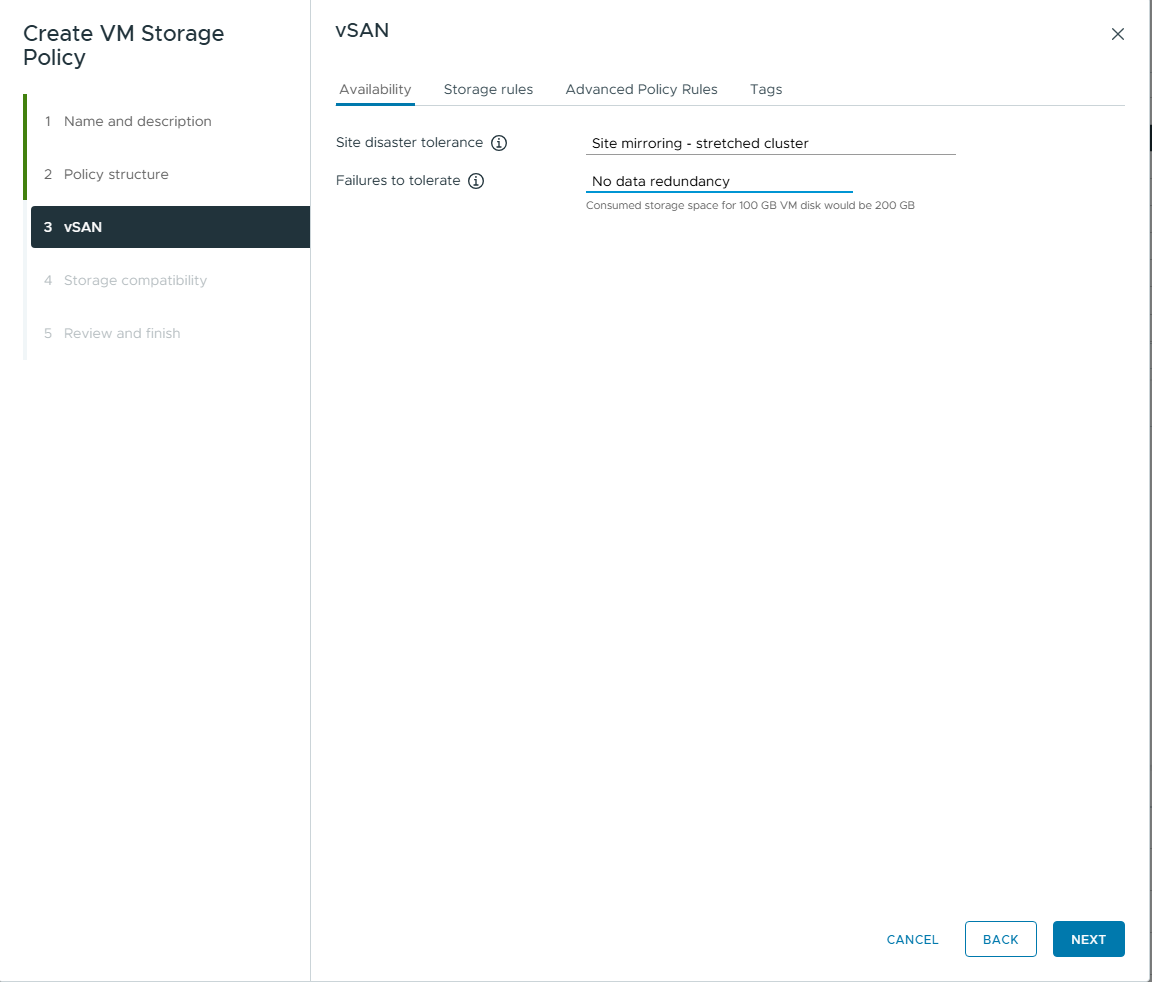
For deployment of vSphere Supervisor we need to create a storage policy compliant with vSAN Stretched Cluster . This policy would be used for placement of supervisor control plane virtual machines. It would also apply to vSphere Namespaces objects, VKS clusters, and persistent volumes.
This environment uses 2 vSAN nodes on each site. The policy I created is Site Mirroring – stretched cluster. There is no data redundancy. This configuration would mirror the objects to the secondary site. However, it lacks a secondary level of resilience.
- AVI Controller Placement for vSphere Supervisor
All 3 AVI Controllers deployed for high availability should be running in the same site of the vSAN Stretched cluster. This setup reduces latency between controllers and ensures they are in sync.
Deployment of vSphere Supervisor
In the vSphere Client navigate to Workload Management and Click on Get Started
Follow the Wizard for deployment of vSphere Supervisor
- Select vCenter Server
- Choose vDS as Networking Stack
- Select vSAN Stretched Cluster as the deployment target
- Select the vSAN Stretched Cluster Storage Policy
- Enter details for AVI Load Balancer
- Enter Details for Management Network
- Enter Details for Workload Network
- Review and Confirm details for deployment
- Click Submit
The json for the deployment is below
{ "specVersion": "1.0", "supervisorSpec": { "supervisorName": "stretched-supervisor" }, "envSpec": { "vcenterDetails": { "vcenterAddress": "vcsa1.env2.lab.test", "vcenterCluster": "Cluster" } }, "tkgsComponentSpec": { "tkgsStoragePolicySpec": { "masterStoragePolicy": "vks stretched policy", "imageStoragePolicy": "vks stretched policy", "ephemeralStoragePolicy": "vks stretched policy" }, "aviComponents": { "aviName": "avi-controller", "aviUsername": "admin", "aviCloudName": "Default-Cloud", "aviController01Ip": "192.168.100.21:443", "aviCertAuthorityChain": "-----BEGIN CERTIFICATE-----\nMIIDdzCCAl+gAwIBAgIUfliBrV4O8Yt6HNuiTmH33MrwxQUwDQYJKoZIhvcNAQEL\nBQAwazELMAkGA1UEBhMCSU4xEjAQBgNVBAgMCUthcm5hdGFrYTESMBAGA1UEBwwJ\nQmFuZ2Fsb3JlMQ0wCwYDVQQKDARFTlYyMQwwCgYDVQQLDANMQUIxFzAVBgNVBAMM\nDjE5Mi4xNjguMTAwLjIxMB4XDTI1MDUzMDEwMjkzNloXDTI2MDUzMDEwMjkzNlow\nazELMAkGA1UEBhMCSU4xEjAQBgNVBAgMCUthcm5hdGFrYTESMBAGA1UEBwwJQmFu\nZ2Fsb3JlMQ0wCwYDVQQKDARFTlYyMQwwCgYDVQQLDANMQUIxFzAVBgNVBAMMDjE5\nMi4xNjguMTAwLjIxMIIBIjANBgkqhkiG9w0BAQEFAAOCAQ8AMIIBCgKCAQEAsB/N\nsCbKGACQVEbVQ0A2GJMKj6gr9haF2QO26PTyxmN5J2D7bxoKpkOy7HxCbca0PrI7\nak3+wyXBU9wDpKHcOFRe7hJjeEBEgNzsh9VeBXLnegsLFJkEv7up6zMk+z1FTCxu\n94JxmxiTgyRcnEKgYaEbVUTO89RRog7RcZY0Fz/Ya+uSUqvgqiFC6O3WLsvvgBeT\ndj5zddIuIbD+SEv5qFE+mj9DpxzAiPKsotVEyAwT5DfmU8Nsj4VK02/H57NaKxMM\nMusragL1yTDdH2CBTRBjXXg/ZYUlYVY8HDmYN5oCR00d5mwS+CfdFN0QVqIRk2lA\n6K8Af10TbZ5+d4Y4nwIDAQABoxMwETAPBgNVHREECDAGhwTAqGQVMA0GCSqGSIb3\nDQEBCwUAA4IBAQA1zdWybXpzsKtEinnzXX0cEUelp6Eedamlpiu1mJo5sExpPJTH\nhU5xf9DJN7msfLO/mfJyZFyuTJhe1BGdLSQ8PPvHDMvOX+C+v7eI3SxxZFolGC4g\nB2vPAXUz3BoS9pZEbSl4tLQuO14my8RV18T+qkIfGPTeq0zHIawfoTT2ZRHYUMH+\nbKT3dW3otORzZSH4KahP1cFFLRP+ACy7RqGeFgDpX0+jmlPPuM78VJDqzTaimvu7\nZKtzKzNE/paxOepSp3Dk04Wm9ZyKlTSsjh/US3KbVtYeGNjxGAr6rk2HhTNaMXmQ\neTspHchmXqkCqH0IfvBQkFqrx8Qtd2KJ0XNS\n-----END CERTIFICATE-----\n" }, "tkgsMgmtNetworkSpec": { "tkgsMgmtNetworkName": "mgmt", "tkgsMgmtIpAssignmentMode": "STATICRANGE", "tkgsMgmtNetworkStartingIp": "192.168.100.60", "tkgsMgmtNetworkGatewayCidr": "192.168.100.1/23", "tkgsMgmtNetworkDnsServers": [ "192.168.100.126" ], "tkgsMgmtNetworkSearchDomains": [ "env2.lab.test" ], "tkgsMgmtNetworkNtpServers": [ "192.168.100.126" ] }, "tkgsPrimaryWorkloadNetwork": { "tkgsPrimaryWorkloadNetworkName": "vks-workload", "tkgsPrimaryWorkloadIpAssignmentMode": "STATICRANGE", "tkgsPrimaryWorkloadPortgroupName": "vks-workload", "tkgsPrimaryWorkloadNetworkGatewayCidr": "192.168.114.1/23", "tkgsPrimaryWorkloadNetworkStartRange": "192.168.114.10", "tkgsPrimaryWorkloadNetworkEndRange": "192.168.114.200", "tkgsWorkloadDnsServers": [ "192.168.100.126" ], "tkgsWorkloadNtpServers": [ "192.168.100.126" ], "tkgsWorkloadServiceCidr": "10.96.0.0/22" }, "apiServerDnsNames": [], "controlPlaneSize": "MEDIUM" }}
Post successful deployment, you will see a running vSphere Supervisor Cluster.
vSphere Supervisor Control Plane Object Placement
The deployment wizard will deploy three control plane virtual machines. There will be vSAN objects in each fault domain. One will act as a witness.
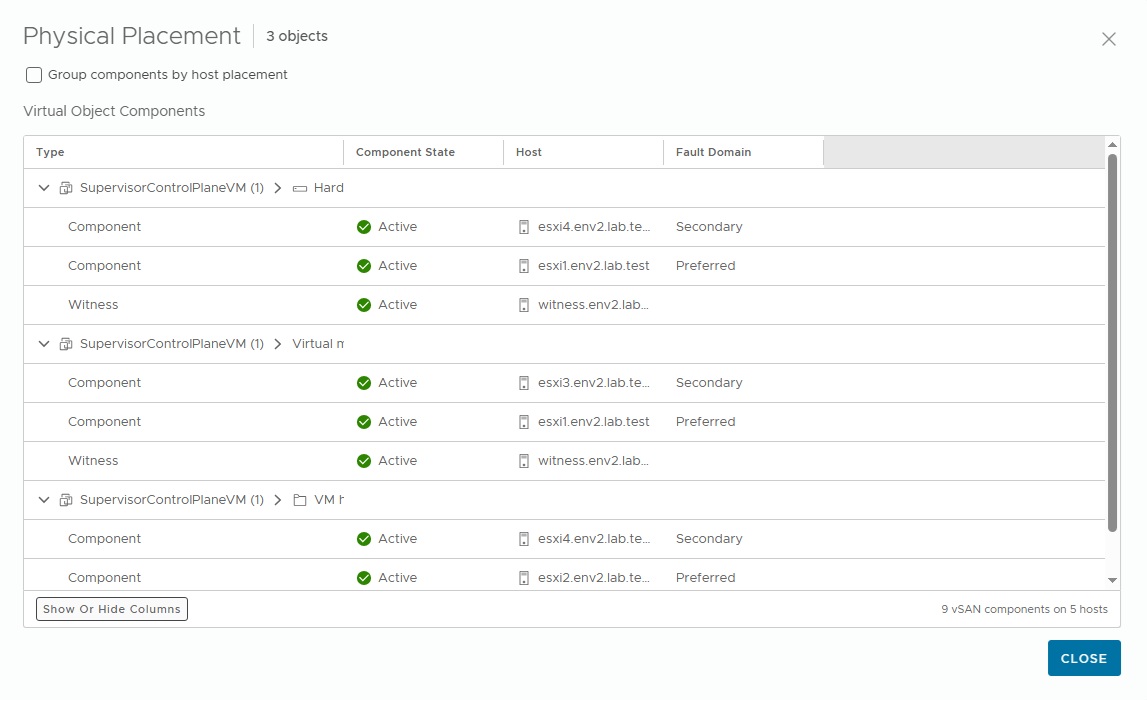
Create DRS Placement rules to ensure vSphere Supervisor Control Plane virtual machines run in a single site. This can be accomplished by creating a VM Group for Supervisor Control Plane virtual machines. Additionally, create a Host Group for Primary Site Hosts. Set up the DRS rule of type Virtual Machines to Hosts with the created groups.
The final step would be to create DRS rules. These rules ensure AVI SE virtual machines are distributed across sites. This is done in a vSAN Stretched Cluster deployment using DRS VM & Host Groups.
Conclusion
Deploying vSphere Supervisor on a vSAN Stretched Cluster provides a resilient platform for running Kubernetes workloads across multiple sites. By leveraging site-level mirroring, fault domains, and a witness host, this architecture ensures that workloads and control plane components remain available even during a site failure. The combination of stretched storage policies, proper fault-domain configuration, and validated cluster health forms the foundation for a highly available Kubernetes infrastructure on vSphere.
In this blog, we walked through the essential steps—from validating the vSAN stretched cluster configuration and storage policies to deploying the Supervisor through the Workload Management wizard. We also highlighted important considerations such as Avi Load Balancer placement, control plane VM placement, and the use of DRS rules to maintain optimal availability and performance across sites.
Disclaimer: All posts, contents and examples are for educational purposes in lab environments only and does not constitute professional advice. No warranty is implied or given. The user accepts that all information, contents, and opinions are my own. They do not reflect the opinions of my employer.
 VMware Cloud Foundation

Leave a comment